As SQL queries grow, they can become walls of nested brackets that nobody – including the person who wrote them – can follow a month later. Subqueries and common table expressions (CTEs) are the two main tools for breaking a complex question into steps. Used well, they make SQL read almost like a short explanation of the logic.
This tutorial explains the different kinds of subquery, how CTEs work, when to choose each, and how to use recursive CTEs for hierarchies and date series. All examples run in SQLite and translate directly to PostgreSQL, SQL Server and MySQL 8+.
Sample data
CREATE TABLE customers (customer_id INTEGER PRIMARY KEY, name TEXT, region TEXT);
INSERT INTO customers VALUES
 (1, 'Ava', 'North'), (2, 'Ben', 'South'), (3, 'Chloe', 'North'),
 (4, 'Dan', 'South'), (5, 'Ella', 'East');

CREATE TABLE orders (order_id INTEGER PRIMARY KEY, customer_id INTEGER, order_date TEXT, amount REAL);
INSERT INTO orders VALUES
 (1, 1, '2024-01-05', 120), (2, 1, '2024-02-11', 80),  (3, 2, '2024-01-20', 45),
 (4, 3, '2024-02-02', 300), (5, 3, '2024-03-15', 150), (6, 3, '2024-03-29', 60),
 (7, 4, '2024-03-03', 20),  (8, 1, '2024-03-21', 95);
Ella (customer 5) has no orders, which will matter for one of the examples.
Step 1: Scalar subqueries
A scalar subquery returns a single value and can be used anywhere a value is allowed. Which orders are above the average order value?
SELECT order_id, amount
FROM orders
WHERE amount > (SELECT AVG(amount) FROM orders)
ORDER BY amount DESC;
The inner query runs first and returns one number (108.75); the outer query compares each order with it. If a scalar subquery accidentally returns more than one row, most databases raise an error (SQLite silently uses the first row – another reason to be careful).
Step 2: Subqueries with IN and EXISTS
A subquery can return a list. Customers in the North who have ordered:
SELECT name
FROM customers
WHERE region = 'North'
  AND customer_id IN (SELECT customer_id FROM orders);
EXISTS asks “is there at least one matching row?”. It is a correlated subquery, because the inner query refers to the outer row (c.customer_id):
SELECT c.name
FROM customers AS c
WHERE EXISTS (
    SELECT 1 FROM orders AS o
    WHERE o.customer_id = c.customer_id AND o.amount >= 100
);
This returns customers with at least one order of £100 or more: Ava and Chloe. For the opposite – customers with no orders – use NOT EXISTS. Avoid NOT IN when the subquery’s column can contain NULL: a single NULL makes NOT IN return nothing. We explain why in SQL Joins Explained.
Step 3: Derived tables (subqueries in FROM)
A subquery in FROM acts as a temporary table. Average spend per customer, where spend is first totalled per customer:
SELECT AVG(total_spent) AS avg_customer_spend
FROM (
    SELECT customer_id, SUM(amount) AS total_spent
    FROM orders
    GROUP BY customer_id
) AS per_customer;
This is a common two-step aggregation: you cannot write AVG(SUM(amount)) in one level of a normal query, so you aggregate once inside and again outside. The result (217.5) is the average across the four customers who ordered; Ella is not included because she has no rows in orders. Whether she should count as zero is a business decision – and a good example of why thinking about each step matters.
Step 4: The same logic as a CTE
A CTE moves the subquery to the top of the query and gives it a name with WITH:
WITH per_customer AS (
    SELECT customer_id, SUM(amount) AS total_spent
    FROM orders
    GROUP BY customer_id
)
SELECT AVG(total_spent) AS avg_customer_spend
FROM per_customer;
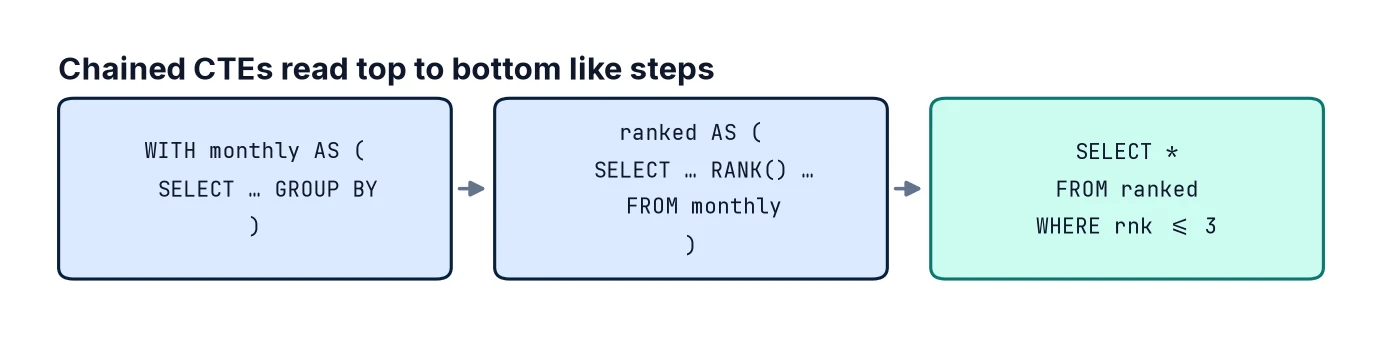
The result is identical, but the query now reads top to bottom: first build per_customer, then use it. The benefit grows quickly with each extra step.
Step 5: Chaining several CTEs
Separate CTEs with commas. Each can refer to the ones defined before it. Here we build a small customer summary, including customers with no orders, and label each one:
WITH per_customer AS (
    SELECT customer_id,
           COUNT(*)        AS orders,
           SUM(amount)     AS total_spent,
           MAX(order_date) AS last_order
    FROM orders
    GROUP BY customer_id
),
all_customers AS (
    SELECT c.customer_id, c.name, c.region,
           COALESCE(p.orders, 0)      AS orders,
           COALESCE(p.total_spent, 0) AS total_spent,
           p.last_order
    FROM customers AS c
    LEFT JOIN per_customer AS p ON p.customer_id = c.customer_id
),
labelled AS (
    SELECT *,
           CASE WHEN total_spent >= 300 THEN 'High value'
                WHEN total_spent > 0    THEN 'Active'
                ELSE 'No orders' END AS segment
    FROM all_customers
)
SELECT name, region, orders, total_spent, last_order, segment
FROM labelled
ORDER BY total_spent DESC;
Each CTE does one job and has a meaningful name. When debugging, you can change the final SELECT to SELECT * FROM per_customer to inspect any intermediate step – one of the most practical advantages of CTEs.
Step 6: CTEs with window functions
CTEs pair naturally with window functions, because you cannot filter on a window function in the same query level. Each customer’s most recent order:
WITH ranked AS (
    SELECT o.*,
           ROW_NUMBER() OVER (PARTITION BY customer_id ORDER BY order_date DESC) AS rn
    FROM orders AS o
)
SELECT customer_id, order_id, order_date, amount
FROM ranked
WHERE rn = 1;
Step 7: Recursive CTEs – generating a date series
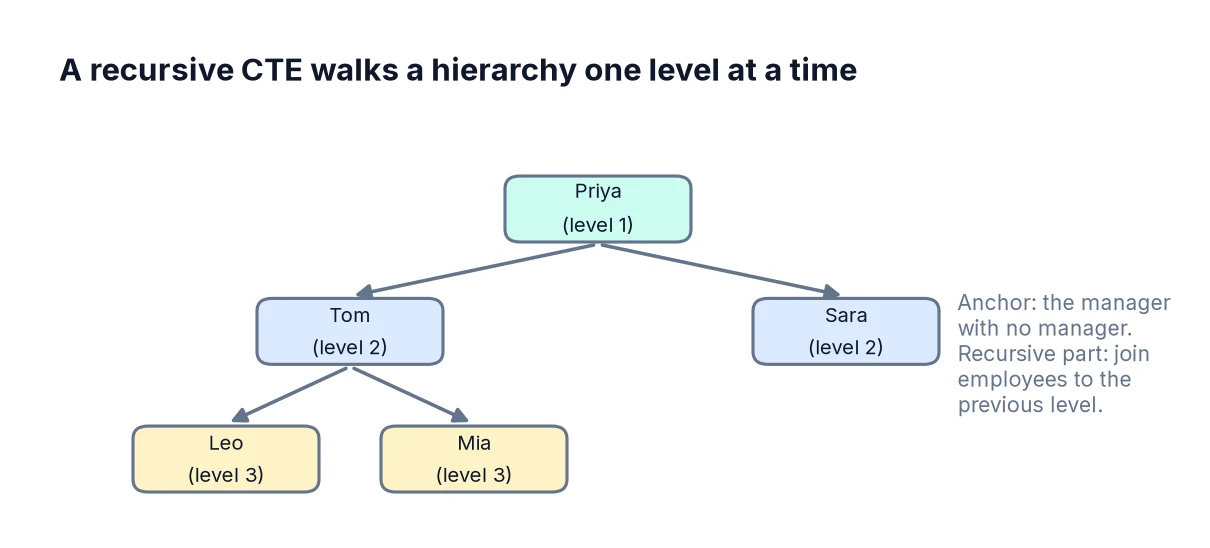
A recursive CTE refers to itself. It has an anchor part (the starting row) and a recursive part that builds on the previous rows, joined with UNION ALL. A common use is generating every month in a range, so months with no sales still appear:
WITH RECURSIVE months(month_start) AS (
    SELECT '2024-01-01'
    UNION ALL
    SELECT date(month_start, '+1 month')
    FROM months
    WHERE month_start < '2024-04-01'
),
monthly AS (
    SELECT strftime('%Y-%m-01', order_date) AS month_start, SUM(amount) AS revenue
    FROM orders
    GROUP BY 1
)
SELECT m.month_start, COALESCE(monthly.revenue, 0) AS revenue
FROM months AS m
LEFT JOIN monthly ON monthly.month_start = m.month_start
ORDER BY m.month_start;
April has no orders, but it appears with zero revenue rather than vanishing from the report – important for charts and month-on-month comparisons. Date functions differ by database: PostgreSQL has generate_series, which does this more simply. In SQL Server, omit the word RECURSIVE.
Step 8: Recursive CTEs – walking a hierarchy
CREATE TABLE staff (id INTEGER, name TEXT, manager_id INTEGER);
INSERT INTO staff VALUES (1, 'Rosa', NULL), (2, 'Sam', 1), (3, 'Tara', 1), (4, 'Umar', 2), (5, 'Vic', 4);

WITH RECURSIVE chain(id, name, level, path) AS (
    SELECT id, name, 0, name FROM staff WHERE manager_id IS NULL
    UNION ALL
    SELECT s.id, s.name, c.level + 1, c.path || ' > ' || s.name
    FROM staff AS s
    JOIN chain AS c ON s.manager_id = c.id
)
SELECT level, name, path FROM chain ORDER BY path;
Starting from the person with no manager, each step adds their direct reports, building the reporting line as it goes. Always make sure recursion stops: a cycle in the data (A manages B, B manages A) would loop forever. Many databases have a recursion limit; you can also add a condition such as WHERE c.level < 20.
CTE or subquery: which should you use?
- Use a CTE for multi-step logic, when you need to reference the same intermediate result more than once, for recursion, and whenever readability matters (which is almost always).
- Use a subquery for short, single-use pieces such as
WHERE amount > (SELECT AVG(amount) FROM orders)or anEXISTScheck. - Performance is usually similar: modern optimisers treat simple CTEs and subqueries alike. Some databases may materialise a CTE (compute it once and store it), which can help or hurt. Check the query plan if performance matters.
Common mistakes
- Using NOT IN with a nullable column. Use NOT EXISTS.
- Scalar subqueries that return several rows.
- Forgetting the comma between CTEs, or adding one after the last CTE.
- Expecting a CTE to persist. It exists only for the single statement that follows it. For reuse, create a view or temporary table.
- Recursive CTEs without a stopping condition.
- Silently excluding entities with no rows, like Ella in Step 3. Decide explicitly whether they count.
FAQ
Do all databases support CTEs?
All major ones do, including SQLite, PostgreSQL, SQL Server, Oracle, MySQL 8+, BigQuery and Snowflake. MySQL 5.7 does not.
Can I use a CTE in an UPDATE or DELETE?
Yes, in most databases, although syntax varies. Test on a copy first.
What is a correlated subquery?
One that refers to columns of the outer query, so it is conceptually evaluated once per outer row – like the EXISTS example above.
How do I run these queries from Python?
See Using SQLite with Python and Pandas.
Next steps
Revisit GROUP BY and HAVING and window functions, which combine naturally with CTEs, and practise on your own data via Python and SQLite.