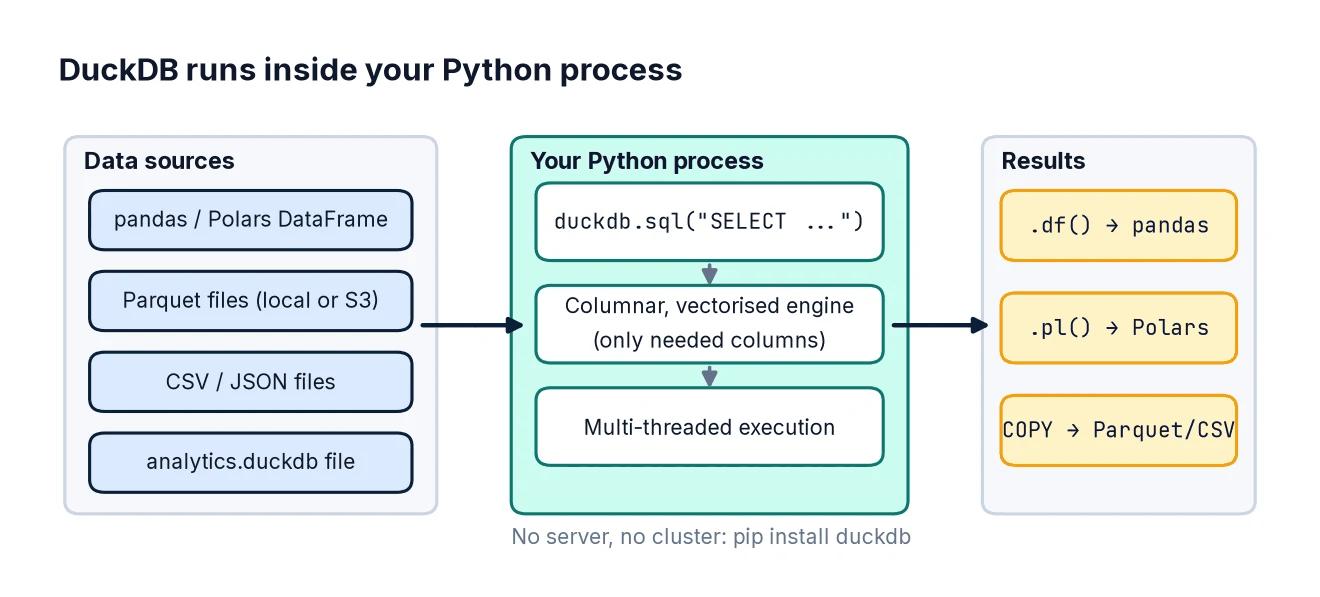
DuckDB is an in-process analytical database: a single library you pip install that runs fast, columnar SQL directly inside your Python process. There is no server to start, no credentials to manage and no data to load before you can query it. You can point it at a CSV file, a folder of Parquet files or a pandas DataFrame that is already in memory and get answers in milliseconds.
That combination has made DuckDB one of the most useful tools an analyst can add to their kit. It fills the gap between pandas (great for in-memory wrangling, awkward for complex aggregations over many files) and a cloud warehouse such as BigQuery or Snowflake (powerful, but billed and remote). This guide shows you how to use DuckDB from Python for real analysis work, the SQL features that make it pleasant, and where its limits are.
If you are new to SQL, start with SQL SELECT and WHERE for Absolute Beginners; everything below builds on the same ideas.
Why DuckDB is different from SQLite
You may already know SQLite with Python and pandas. Both are embedded databases that live in a single file, but they are designed for opposite workloads.
| SQLite | DuckDB | |
|---|---|---|
| Storage layout | Row-oriented | Column-oriented |
| Best at | Many small reads and writes (OLTP) | Scans and aggregations over millions of rows (OLAP) |
| Execution | One row at a time | Vectorised, multi-threaded |
| Reads Parquet/CSV directly | No | Yes, including globs and remote files |
| Queries pandas DataFrames | No (you load them first) | Yes, by variable name |
| Typical use | App storage, config, small datasets | Local analytics, data pipelines, notebooks |
A columnar engine only reads the columns your query mentions, and it processes them in batches that suit modern CPUs. For a GROUP BY over 50 million rows that is the difference between minutes and a second or two on a laptop.
Installing and running your first query
pip install duckdb pandas pyarrowimport duckdb
print(duckdb.__version__)
print(duckdb.sql("SELECT 42 AS answer, 'hello' AS greeting").fetchall())duckdb.sql() uses a default in-memory database. That is perfect for exploration. When you want results to persist between sessions, connect to a file instead:
con = duckdb.connect("analytics.duckdb")   # created if it does not exist
con.sql("CREATE TABLE IF NOT EXISTS notes (id INTEGER, txt VARCHAR)")
con.close()
Querying a pandas DataFrame with SQL
This is the feature that wins most people over. DuckDB can see Python variables that hold DataFrames and query them as if they were tables – no copying or loading step.
import numpy as np
import pandas as pd
import duckdb

rng = np.random.default_rng(7)
n = 200_000
orders = pd.DataFrame({
    "order_id": np.arange(1, n + 1),
    "order_date": pd.Timestamp("2026-01-01") + pd.to_timedelta(rng.integers(0, 300, n), unit="D"),
    "region": rng.choice(["North", "South", "East", "West"], n),
    "channel": rng.choice(["web", "app", "store"], n, p=[0.5, 0.3, 0.2]),
    "amount": rng.gamma(2.0, 30.0, n).round(2),
})

monthly = duckdb.sql("""
    SELECT date_trunc('month', order_date) AS month,
           region,
           COUNT(*)              AS orders,
           ROUND(SUM(amount), 2) AS revenue,
           ROUND(AVG(amount), 2) AS avg_order
    FROM orders
    GROUP BY ALL
    ORDER BY month, region
""").df()

print(monthly.head())
Notice GROUP BY ALL: DuckDB groups by every non-aggregated column in the SELECT list, so you never get the “column must appear in the GROUP BY clause” error. The .df() call returns a pandas DataFrame, so you can carry on in pandas, plot with Matplotlib or export to Excel. Other result methods include .pl() for Polars, .arrow() for an Arrow table and .fetchall() for plain Python tuples.
The same aggregation in pandas would be a groupby with named aggregations. Neither is “right”; DuckDB simply lets you use SQL when SQL is clearer, especially for multi-step logic with joins and window functions.
Reading CSV and Parquet files directly
DuckDB treats files as tables. Write the data out first so the example is self-contained:
import os

os.makedirs("data/orders", exist_ok=True)
orders.to_csv("data/orders.csv", index=False)
for ch, part in orders.groupby("channel"):
    part.to_parquet(f"data/orders/channel={ch}.parquet", index=False)
Now query the files without loading them:
duckdb.sql("""
    SELECT channel, COUNT(*) AS n, ROUND(SUM(amount), 2) AS revenue
    FROM 'data/orders.csv'
    GROUP BY channel
    ORDER BY revenue DESC
""").show()

duckdb.sql("""
    SELECT region, ROUND(AVG(amount), 2) AS avg_amount
    FROM read_parquet('data/orders/*.parquet', filename = true)
    WHERE amount > 50
    GROUP BY region
""").show()
A few points worth knowing:
read_csvauto-detects delimiters, headers and column types. If detection gets a column wrong, pass explicit types:read_csv('file.csv', types = {'postcode': 'VARCHAR'}), which avoids losing leading zeros.- Glob patterns such as
*.parquetread a whole folder as one table, andfilename = trueadds a column showing which file each row came from. - With Parquet, DuckDB pushes filters and column selection down into the file reader, so a query touching two columns reads only those two columns from disk.
Joins, window functions and QUALIFY
DuckDB speaks a rich, PostgreSQL-flavoured dialect. Everything from SQL Window Functions: A Gentle Guide works, plus some conveniences. QUALIFY filters on a window function without wrapping the query in a CTE:
targets = pd.DataFrame({
    "region": ["North", "South", "East", "West"],
    "monthly_target": [300_000, 280_000, 260_000, 250_000],
})

duckdb.sql("""
    WITH m AS (
        SELECT region,
               date_trunc('month', order_date) AS month,
               SUM(amount) AS revenue
        FROM orders
        GROUP BY ALL
    )
    SELECT m.region, m.month, ROUND(m.revenue) AS revenue,
           t.monthly_target,
           ROUND(100.0 * m.revenue / t.monthly_target, 1) AS pct_of_target
    FROM m
    JOIN targets t USING (region)
    QUALIFY ROW_NUMBER() OVER (PARTITION BY m.region ORDER BY m.revenue DESC) = 1
    ORDER BY revenue DESC
""").show()
That query returns each region’s best month and how it compared with target. Other quality-of-life features include SELECT * EXCLUDE (col), SELECT * REPLACE (expr AS col), COLUMNS('regex') for applying an expression to many columns, and friendly PIVOT/UNPIVOT statements.
Building a small local analytics database
For recurring work, store cleaned tables in a .duckdb file. This pattern is a lightweight version of what dbt and cloud warehouses do at scale:
con = duckdb.connect("analytics.duckdb")

con.sql("""
    CREATE OR REPLACE TABLE fact_orders AS
    SELECT order_id,
           CAST(order_date AS DATE) AS order_date,
           region, channel, amount
    FROM read_parquet('data/orders/*.parquet')
""")

con.sql("""
    CREATE OR REPLACE VIEW daily_revenue AS
    SELECT order_date, SUM(amount) AS revenue
    FROM fact_orders
    GROUP BY order_date
""")

print(con.sql("SELECT COUNT(*) AS n FROM fact_orders").fetchall())
print(con.sql("SELECT * FROM daily_revenue ORDER BY order_date LIMIT 3").df())

con.sql("COPY (SELECT * FROM daily_revenue) TO 'daily_revenue.parquet' (FORMAT parquet)")
con.close()
COPY ... TO exports any query to CSV or Parquet, which makes DuckDB a handy conversion tool as well as a query engine.
How fast is it in practice?
Speed depends on your hardware and data, so measure on your own workload. A simple timing harness:
import time

def timeit(label, fn, repeat=3):
    best = min(_run(fn) for _ in range(repeat))
    print(f"{label:<10} {best * 1000:7.1f} ms")

def _run(fn):
    t0 = time.perf_counter()
    fn()
    return time.perf_counter() - t0

timeit("pandas", lambda: orders.groupby(["region", "channel"])["amount"].agg(["sum", "mean", "count"]))
timeit("duckdb", lambda: duckdb.sql(
    "SELECT region, channel, SUM(amount), AVG(amount), COUNT(*) FROM orders GROUP BY ALL").df())
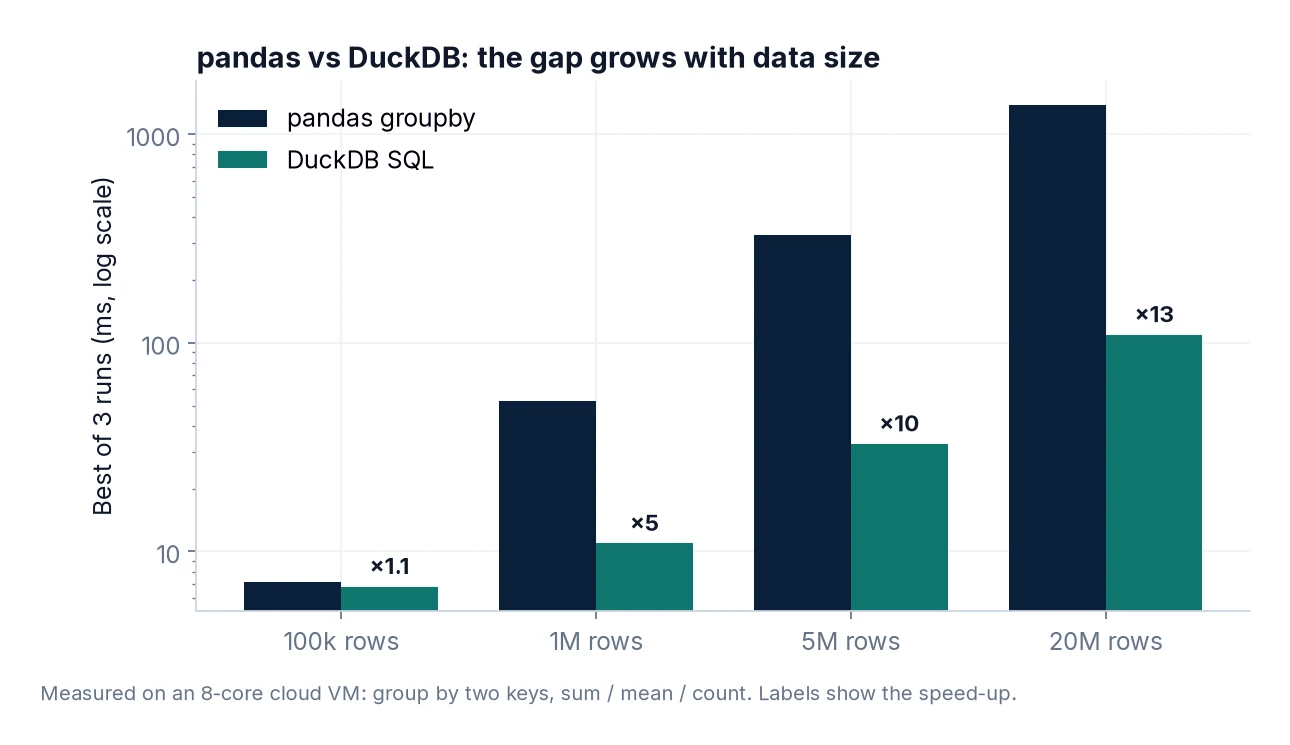
On small DataFrames the two are close – DuckDB has a little start-up overhead per query. The gap opens as data grows, as queries get more complex (several joins, window functions, distinct counts) and especially when data sits in Parquet files that pandas would need to load in full first.
When to use DuckDB – and when not to
| Situation | Good fit? | Why |
|---|---|---|
| Exploring a 5 GB folder of Parquet or CSV files on a laptop | Yes | Reads only what it needs, uses all cores |
Replacing a tangle of pandas merge and groupby chains |
Yes | SQL is often shorter and easier to review |
| Local development of dbt models before a warehouse | Yes | The dbt-duckdb adapter is popular for this |
| A web app with many concurrent users writing data | No | Use PostgreSQL – DuckDB allows one writer process |
| Petabyte-scale shared data with access controls | No | Use a cloud warehouse or lakehouse |
| Tiny one-off edits to a spreadsheet | Usually not | Excel or pandas is simpler |
Common pitfalls
- Locking a database file. Only one process can open a
.duckdbfile for writing. If a notebook holds a connection, a script will fail to open it. Close connections or open read-only withduckdb.connect('file.duckdb', read_only=True). - Ambiguous CSV types. Auto-detection samples rows. A column that looks numeric for the first thousand rows but contains
N/Alater can cause errors; settypesorall_varchar = trueand cast yourself. - Forgetting it is case-insensitive for identifiers.
Regionandregionrefer to the same column; quote names with double quotes if your data has awkward headers. - Mixing time zones.
TIMESTAMPandTIMESTAMPTZbehave differently. Decide early and convert consistently. - Treating it as a server database. It is embedded. For many users and many writers, choose a client–server database.
FAQ
Is DuckDB free for commercial use?
Yes. DuckDB is open source under the MIT licence. MotherDuck offers a commercial cloud service built on it, but the library itself is free.
Can DuckDB replace pandas?
Not entirely. Use DuckDB for heavy SQL-shaped work – filtering, joining and aggregating large data – and pandas for row-level manipulation, quick plotting and the wider Python ecosystem. They hand data back and forth cheaply through Arrow.
Does DuckDB work with Excel files?
Yes, through the excel extension or by reading with pandas first. For most workflows, convert spreadsheets to Parquet once and query those.
How big can the data be?
DuckDB can process data larger than memory by spilling to disk, so tens or hundreds of gigabytes on a single machine is realistic. Beyond that, a distributed warehouse usually makes more sense.
Next steps
Try rewriting one of your existing pandas notebooks with DuckDB and compare readability as well as speed. If you want to strengthen the SQL side first, work through CTEs vs Subqueries – DuckDB rewards well-structured queries.