
Raw tables answer “what happened?” one row at a time. Most business questions, though, are about totals and averages: revenue per month, orders per customer, average basket size per store. In SQL, those summaries are produced with GROUP BY, aggregate functions and the HAVING clause.
This tutorial explains how grouping works, which aggregate functions to use, how NULL values affect them, and the difference between WHERE and HAVING – a point that confuses many learners. All examples run in SQLite and work with small changes in PostgreSQL, SQL Server and MySQL.
Sample table
CREATE TABLE sales (
    sale_id    INTEGER PRIMARY KEY,
    sale_date  TEXT,
    store      TEXT,
    category   TEXT,
    customer_id INTEGER,
    amount     REAL
);
INSERT INTO sales VALUES
 (1,  '2024-01-04', 'Leeds',   'Books',  10, 24.00),
 (2,  '2024-01-09', 'Leeds',   'Games',  11, 55.00),
 (3,  '2024-01-15', 'York',    'Books',  10, 12.50),
 (4,  '2024-01-20', 'York',    'Music',  12, 9.99),
 (5,  '2024-02-02', 'Leeds',   'Books',  13, 31.00),
 (6,  '2024-02-11', 'Leeds',   'Games',  11, 70.00),
 (7,  '2024-02-14', 'Hull',    'Books',  14, 18.00),
 (8,  '2024-02-21', 'York',    'Games',  15, NULL),
 (9,  '2024-03-03', 'Hull',    'Music',  14, 14.99),
 (10, '2024-03-18', 'Leeds',   'Books',  10, 22.00);
Sale 8 has a missing amount, perhaps because a refund is pending. We will see how that affects the results.
Step 1: Aggregate functions without grouping
Aggregate functions collapse many rows into one value:
SELECT COUNT(*)        AS rows_in_table,
       COUNT(amount)   AS rows_with_amount,
       SUM(amount)     AS total,
       AVG(amount)     AS average,
       MIN(amount)     AS smallest,
       MAX(amount)     AS largest
FROM sales;
COUNT(*) returns 10 but COUNT(amount) returns 9, because aggregate functions (other than COUNT(*)) ignore NULL. AVG(amount) therefore divides by 9, not 10. That is usually what you want, but you should know it is happening. If a NULL should count as zero, write AVG(COALESCE(amount, 0)).
Step 2: GROUP BY one column
Add GROUP BY to get one result row per group:
SELECT store,
       COUNT(*)              AS sales_count,
       ROUND(SUM(amount), 2) AS revenue
FROM sales
GROUP BY store
ORDER BY revenue DESC;
The database splits the rows into one bucket per store, applies the aggregates to each bucket, and returns one row per bucket. If you have used pandas, this is the same split-apply-combine idea as pandas groupby.
Step 3: The golden rule of GROUP BY
Every column in SELECT must either be in the GROUP BY list or be wrapped in an aggregate function. This query breaks the rule:
-- Invalid in most databases: which category should be shown for Leeds?
-- SELECT store, category, SUM(amount) FROM sales GROUP BY store;
Leeds has both Books and Games, so there is no single category to display. PostgreSQL and SQL Server reject the query with an error. SQLite and some MySQL configurations accept it and return an arbitrary value from the group, which is worse, because the result looks fine but is meaningless. Follow the rule even when your database lets you break it.
Step 4: GROUP BY several columns
SELECT store,
       category,
       COUNT(*)    AS sales_count,
       SUM(amount) AS revenue
FROM sales
GROUP BY store, category
ORDER BY store, category;
Now there is one row per store–category combination that appears in the data. Combinations with no sales simply do not appear. If you need them (for example, to show a zero), you have to generate the combinations first and left join the sales onto them – see SQL Joins Explained.
Step 5: Group by month
Date functions vary between databases. In SQLite, strftime extracts parts of a date:
SELECT strftime('%Y-%m', sale_date) AS month,
       COUNT(*)                     AS sales_count,
       ROUND(SUM(amount), 2)        AS revenue
FROM sales
GROUP BY month
ORDER BY month;
The equivalents are DATE_TRUNC('month', sale_date) in PostgreSQL, DATETRUNC(month, sale_date) in SQL Server 2022 or later (or FORMAT(sale_date, 'yyyy-MM') in older versions), and DATE_FORMAT(sale_date, '%Y-%m') in MySQL. SQLite and MySQL allow you to use the alias month in GROUP BY; PostgreSQL also accepts it, but SQL Server requires you to repeat the expression.
Step 6: COUNT DISTINCT
How many different customers bought from each store?
SELECT store,
       COUNT(*)                    AS sales_count,
       COUNT(DISTINCT customer_id) AS unique_customers
FROM sales
GROUP BY store;
Leeds has five sales but only three unique customers, because customers 10 and 11 bought more than once. Confusing “number of sales” with “number of customers” is a common reporting error.
Step 7: Filter groups with HAVING
WHERE filters rows before grouping. HAVING filters groups after aggregation. To show only stores with revenue over £50:
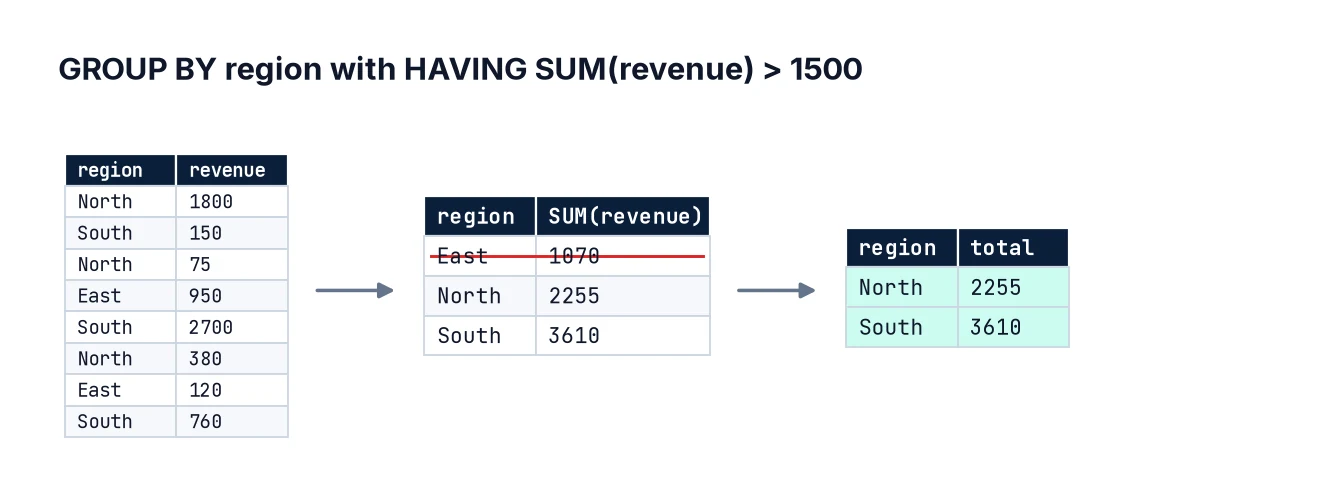
SELECT store, SUM(amount) AS revenue
FROM sales
GROUP BY store
HAVING SUM(amount) > 50;
You cannot write WHERE SUM(amount) > 50, because when WHERE runs, the sums have not been calculated yet.
Step 8: Use WHERE and HAVING together
Most real queries use both. For example: among Books sales only, which stores sold at least two items?
SELECT store,
       COUNT(*)    AS book_sales,
       SUM(amount) AS book_revenue
FROM sales
WHERE category = 'Books'
GROUP BY store
HAVING COUNT(*) >= 2;
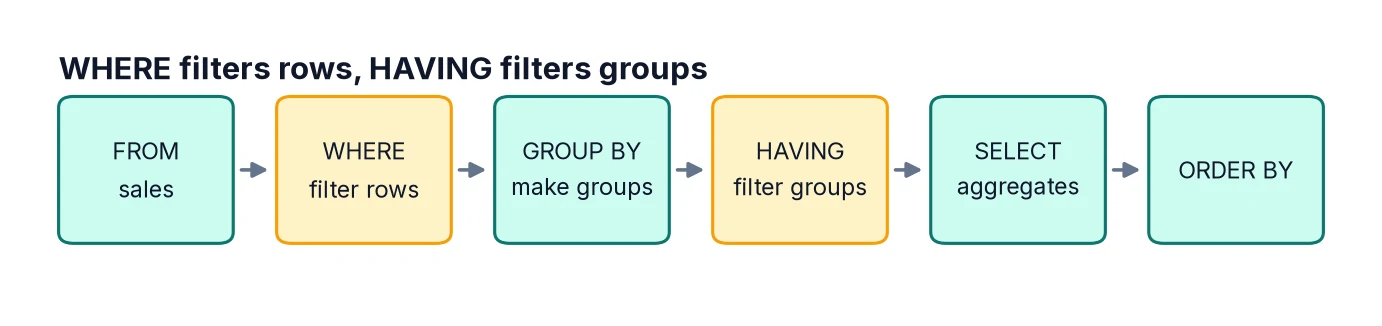
The logical order is FROM → WHERE → GROUP BY → HAVING → SELECT → ORDER BY. Filtering in WHERE when you can is also more efficient, because fewer rows need to be grouped.
Step 9: Conditional aggregation
A very useful pattern is putting a CASE expression inside an aggregate, which lets you produce several filtered totals in one pass – effectively a pivot table in SQL:
SELECT store,
       SUM(CASE WHEN category = 'Books' THEN amount ELSE 0 END) AS books,
       SUM(CASE WHEN category = 'Games' THEN amount ELSE 0 END) AS games,
       SUM(CASE WHEN category = 'Music' THEN amount ELSE 0 END) AS music,
       SUM(amount) AS total
FROM sales
GROUP BY store
ORDER BY store;
This is often simpler and more portable than database-specific PIVOT syntax.
Step 10: Percentages of a total
To show each store’s share of total revenue, divide by the overall sum. A scalar subquery works everywhere:
SELECT store,
       SUM(amount) AS revenue,
       ROUND(100.0 * SUM(amount) / (SELECT SUM(amount) FROM sales), 1) AS pct_of_total
FROM sales
GROUP BY store
ORDER BY revenue DESC;
Note the 100.0: multiplying by a decimal avoids integer division in databases that would otherwise round down. With window functions you can write this as SUM(amount) / SUM(SUM(amount)) OVER (); see SQL Window Functions.
Common mistakes
- Selecting non-aggregated columns not in GROUP BY. Some databases allow it and return arbitrary values.
- Using WHERE for aggregate conditions. Use HAVING.
- Using HAVING for row conditions. It works in some databases but is slower and less clear; use WHERE.
- Forgetting that AVG ignores NULL. Decide whether NULL means “unknown” or “zero”.
- COUNT(*) after a LEFT JOIN, which counts unmatched rows as 1. Count a column from the right-hand table instead.
- Averaging averages. Compute averages from the underlying rows, not from pre-aggregated averages with different group sizes.
FAQ
Does GROUP BY sort the results?
Not reliably. Some databases happen to return sorted output, but that is not guaranteed. Always add ORDER BY.
Can I GROUP BY a column I do not select?
Yes, it is valid, though the output may be confusing because groups are not labelled.
What is GROUP BY ROLLUP?
An extension (supported in PostgreSQL, SQL Server, MySQL and others, but not SQLite) that adds subtotal and grand-total rows.
How is this different from DISTINCT?
SELECT DISTINCT store FROM sales and SELECT store FROM sales GROUP BY store return the same list. Use GROUP BY when you need aggregates.
Next steps
If you need a refresher on the basics, see SQL SELECT and WHERE. Next, learn window functions for running totals and rankings, and CTEs to keep longer queries readable. To do the same summaries in a spreadsheet, see Excel Pivot Tables.