
AI chat assistants such as ChatGPT, Claude, Gemini and Microsoft Copilot can speed up data analysis considerably. They can explain an unfamiliar dataset, draft pandas or SQL code, suggest charts and help you word your findings. They can also produce confident, plausible and completely wrong answers – and they can create real privacy problems if you paste in the wrong data.
This guide shows a practical, safe workflow for using AI assistants in data analysis: what to share and what not to, how to write prompts that produce useful output, how to get code rather than unverifiable answers, and how to check the results. The principles apply to whichever assistant you use; features and menus change often, so we focus on the approach rather than specific buttons.
Step 1: Decide what you are allowed to share
Before you upload anything, ask whether you have the right to send that data to a third-party service. Under UK GDPR, personal data (names, emails, customer IDs linked to people, health information) needs a lawful basis and appropriate safeguards for processing, and many employers prohibit putting company data into consumer AI tools. Check:
- Your organisation’s AI or acceptable-use policy.
- Whether you are using a business/enterprise plan with contractual data protections, or a personal account.
- The tool’s data settings – for example, whether conversations may be used to train models, and how to turn that off.
A safe default is to share structure, not data: column names, data types and a few fake or anonymised example rows are usually enough for the assistant to write correct code, which you then run on the real data on your own machine.
Step 2: Generate a safe description of your dataset
Instead of uploading a file, produce a compact summary locally and paste that. This Python snippet creates one from any DataFrame without exposing individual records:
import pandas as pd
import numpy as np

# Example data - replace with your own pd.read_csv(...)
rng = np.random.default_rng(0)
df = pd.DataFrame({
    "order_date": pd.date_range("2024-01-01", periods=500, freq="D"),
    "region": rng.choice(["North", "South", "East", "West"], 500),
    "channel": rng.choice(["Online", "Store"], 500, p=[0.6, 0.4]),
    "basket_value": rng.gamma(2.0, 25.0, 500).round(2),
    "customer_email": [f"user{i}@example.com" for i in range(500)],
})

def describe_for_ai(df, sensitive=()):
    lines = [f"Rows: {len(df)}, Columns: {df.shape[1]}"]
    for col in df.columns:
        s = df[col]
        info = f"- {col} ({s.dtype}), missing={s.isna().sum()}"
        if col in sensitive:
            info += ", SENSITIVE - values withheld"
        elif pd.api.types.is_numeric_dtype(s):
            info += f", min={s.min()}, median={s.median()}, max={s.max()}"
        elif pd.api.types.is_datetime64_any_dtype(s):
            info += f", from {s.min().date()} to {s.max().date()}"
        else:
            info += f", {s.nunique()} unique, e.g. {list(s.dropna().unique()[:4])}"
        lines.append(info)
    return "\n".join(lines)

print(describe_for_ai(df, sensitive=["customer_email"]))
The output lists each column’s type, missing values and either a numeric range or a few example categories, while withholding the column you mark as sensitive. Paste that into the assistant as context.
Step 3: Write prompts with context, task and format
Vague prompts get vague answers. A reliable structure is:
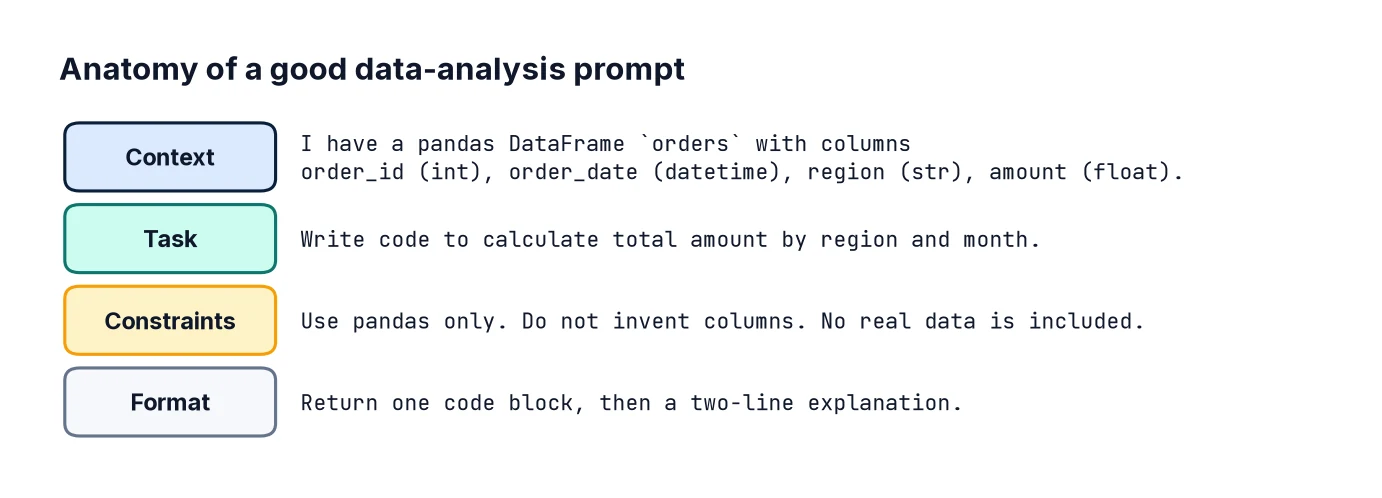
- Context – who you are, what the data is, the tools you use.
- Task – one specific thing to do.
- Constraints – libraries, versions, style, what not to do.
- Output format – code only, a table, numbered steps.
Compare a weak prompt with a strong one:
Weak:
"Analyse my sales data."

Strong:
"I'm analysing retail orders in pandas 2.x. The DataFrame `df` has these columns:
[paste output of describe_for_ai]
Write Python code that:
1. Calculates monthly total basket_value by channel.
2. Calculates each channel's share of each month's total.
3. Plots both channels as lines on one chart with matplotlib, with labelled axes.
Use only pandas and matplotlib. Don't invent columns that aren't listed.
Add brief comments. Return code only."
The strong prompt names the exact columns, the libraries, the steps and the output. It also tells the assistant not to invent columns – a common failure when it has to guess.
Step 4: Ask for code, not answers
If you ask “what was the average basket value in March?”, the assistant may calculate it, estimate it or simply make up a number, and you cannot easily tell which. If you ask for code that calculates it, you can read the logic, run it on your real data and verify the result. This is the single most important habit.
Some assistants can run Python themselves on uploaded files. That is convenient for non-sensitive data, but the same rule applies: ask to see the code it ran, and check it.
Step 5: Verify the code before trusting it
AI-generated code often runs without errors but does something slightly different from what you asked. Check it in three ways:

- Read it. Does each line do what the comment says? Watch for wrong column names, filters on the wrong value, and averages where you wanted sums.
- Test it on a tiny dataset where you know the answer.
- Cross-check one figure independently by a different route.
For example, suppose the assistant produced this code for the monthly shares:
df["month"] = df["order_date"].dt.to_period("M")
monthly = df.groupby(["month", "channel"])["basket_value"].sum().unstack()
share = monthly.div(monthly.sum(axis=1), axis=0)
print(share.head())
You can verify it with simple checks: shares should add up to 1 in every month, and one month’s figure should match a manual filter.
assert np.allclose(share.sum(axis=1), 1.0)

jan_online = df[(df["month"] == "2024-01") & (df["channel"] == "Online")]["basket_value"].sum()
assert np.isclose(jan_online, monthly.loc["2024-01", "Online"])
print("Checks passed")
Two lines of checking catch a large share of errors, such as dividing by the wrong axis.
Step 6: Use the assistant to explain, not just to produce
Some of the best uses of AI in data work are explanatory:
- “Explain this SQL query line by line and tell me what happens to rows with NULL in customer_id.”
- “Here is an error message and the code that caused it. What are the likely causes?”
- “What are the assumptions of linear regression, and how could I check each in Python?”
- “Suggest five questions worth asking of a dataset with these columns.”
Treat the answers as a knowledgeable colleague’s suggestions: helpful, but to be checked against documentation for anything important.
Step 7: Use it to draft – then edit – the write-up
Once you have verified results, an assistant can help turn them into clear prose: “Here are my verified figures [paste]. Write a 150-word summary for a non-technical manager, in UK English, no jargon, and don’t add any figures that aren’t in the list.” The final instruction matters, because assistants sometimes embellish with numbers or causes that you never gave them. Always read the draft against your figures before sending it.
Useful prompt templates
Data cleaning:
"Given these columns [paste], write pandas code to: strip whitespace from text columns,
standardise 'region' to title case, convert 'order_date' from DD/MM/YYYY strings,
and report how many values failed to convert. Don't drop any rows."

SQL:
"Using tables orders(order_id, customer_id, order_date, amount) and
customers(customer_id, region), write a SQLite query for monthly revenue by region,
including regions with zero revenue. Explain how the query handles NULLs."

Debugging:
"This code raises [paste full error]. Here is the code [paste]. pandas version 2.2.
Explain the cause, then give the minimal fix."

Review:
"Review this code for bugs, data leakage or incorrect logic. List issues by severity.
Don't rewrite the whole thing."
Common mistakes
- Pasting personal or confidential data into a tool without permission.
- Accepting numbers the assistant states without code you can check.
- Not giving column names and types, so the assistant invents them.
- Asking for everything at once. Break big analyses into small, checkable steps.
- Trusting statistical advice blindly. Assistants can recommend inappropriate tests or overlook leakage. Check against reliable sources.
- Forgetting reproducibility. Save the final code in a script or notebook, not just in a chat history.
FAQ
Can AI replace learning pandas or SQL?
No. You need enough knowledge to read and verify what it produces. The better you know the tools, the more useful an assistant becomes. Start with reading data with pandas and SQL basics.
Is it safe to upload spreadsheets?
Only if the data is non-sensitive or your organisation has approved the tool for that data. When in doubt, share structure and synthetic examples instead.
Why does the assistant give a different answer each time?
Responses are generated with some randomness and depend on the exact wording and conversation history. Another reason to rely on code you can rerun.
How do I spot hallucinations?
Be suspicious of specific figures, function names or citations you did not supply. We cover this in AI Hallucinations: How to Check AI Outputs.
Next steps
See AI Coding Assistants for Data Science for using AI inside your editor, and Calling an LLM API from Python to automate tasks. To sharpen the skills you need to check AI output, work through Cleaning Messy Data with Pandas and pandas groupby.