
Imagine a student who has seen the exam paper in advance. They score 100%, but that tells you nothing about whether they understand the subject. Machine learning models have exactly the same problem: if you test a model on the data it learned from, it can look brilliant and still fail on anything new.
The train/test split is the simplest and most important defence against that. This tutorial explains what it is, why it works, how to do it in Python with scikit-learn, and the subtle mistakes – especially data leakage – that make many beginner models look far better than they really are.
What you need
- Python 3.9+ with
pandas,numpyandscikit-learn(pip install pandas scikit-learn). - No downloads: the examples use datasets bundled with scikit-learn.
Why we split data
A model’s job is to generalise: to make good predictions on data it has never seen. We cannot measure that using the training data, because a flexible model can memorise it. So we hold back a portion of the data, train only on the rest, and evaluate on the held-back portion. The test set acts as a stand-in for future, unseen data.

Let us see the problem directly. A decision tree with no depth limit can memorise its training data almost perfectly:
from sklearn.datasets import load_breast_cancer
from sklearn.tree import DecisionTreeClassifier
from sklearn.model_selection import train_test_split

X, y = load_breast_cancer(return_X_y=True, as_frame=True)
print(X.shape)            # 569 rows, 30 features
print(y.value_counts())   # 1 = benign, 0 = malignant

# Wrong: train and evaluate on the same data
tree = DecisionTreeClassifier(random_state=42).fit(X, y)
print("Accuracy on training data:", tree.score(X, y))
The model scores 1.0 – perfect – on the data it was trained on. That number is meaningless as an estimate of real-world performance.
Step 1: Split with train_test_split
X_train, X_test, y_train, y_test = train_test_split(
    X, y,
    test_size=0.2,      # 20% held back for testing
    random_state=42,    # makes the split reproducible
    stratify=y,         # keep class proportions the same in both sets
)
print(X_train.shape, X_test.shape)

tree = DecisionTreeClassifier(random_state=42).fit(X_train, y_train)
print("Train accuracy:", round(tree.score(X_train, y_train), 3))
print("Test accuracy: ", round(tree.score(X_test, y_test), 3))
The training accuracy is still perfect, but the test accuracy is noticeably lower. The test figure is the honest one. The gap between the two is a sign of overfitting: the model has learned noise specific to the training rows.
The four outputs always come back in the same order: training features, test features, training labels, test labels. Getting that order wrong is an easy slip, so it is worth memorising.
Step 2: Understand the parameters
- test_size: the fraction (or number of rows) for the test set. 20–25% is common. With very large datasets, a smaller percentage is fine because even 5% is many rows.
- random_state: the split is random; fixing this number means you get the same split each time, so results are reproducible and comparable.
- stratify: for classification, passing the labels keeps the proportion of each class equal across train and test. This matters a lot when one class is rare.
- shuffle: defaults to
True. Set it toFalseonly for time-ordered data (see Step 5).
You can check that stratification worked:
print(y_train.mean().round(3), y_test.mean().round(3))Both proportions should be almost identical.
Step 3: Avoid data leakage from preprocessing
Data leakage means information from the test set influences training. The most common source is preprocessing the whole dataset before splitting – for example, scaling with the mean and standard deviation of all rows, or filling missing values with the overall median. The model then indirectly “sees” the test data.
The rule is: split first, then fit every preprocessing step on the training data only. scikit-learn’s Pipeline makes this automatic:
from sklearn.pipeline import make_pipeline
from sklearn.preprocessing import StandardScaler
from sklearn.linear_model import LogisticRegression

model = make_pipeline(StandardScaler(), LogisticRegression(max_iter=1000))
model.fit(X_train, y_train)          # scaler learns from training data only
print("Test accuracy:", round(model.score(X_test, y_test), 3))
When you call model.score(X_test, y_test), the pipeline applies the scaling learned from the training set to the test data. Nothing about the test set leaks back.
Other forms of leakage to watch for include features that would not be available at prediction time (for example, a “refund issued” column when predicting whether a customer will complain) and duplicate records that end up in both sets.
Step 4: Use a validation set for tuning
If you try several models or settings and pick whichever scores best on the test set, the test set stops being unseen – you have tuned to it. The cleaner approach is three sets:
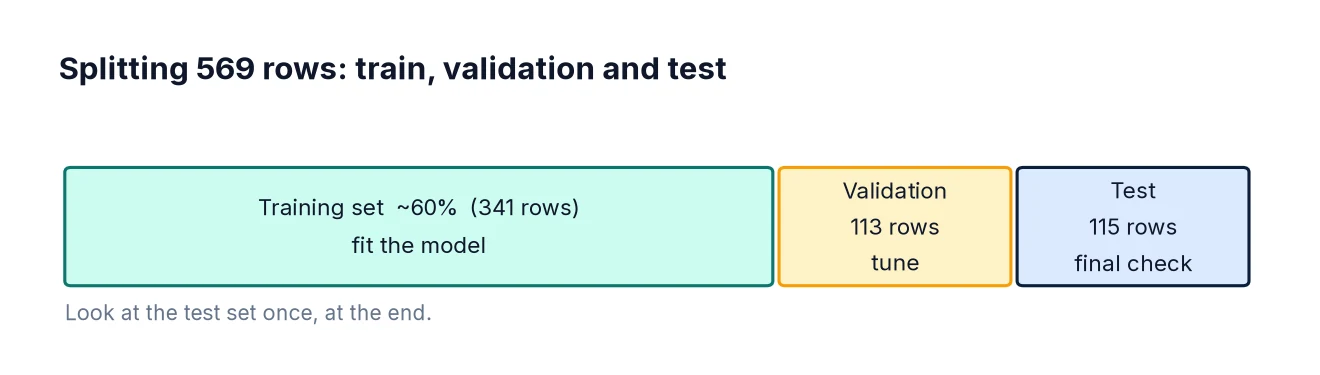
- Training set to fit models.
- Validation set to compare models and choose settings.
- Test set used once, at the very end, for the final estimate.
X_temp, X_test, y_temp, y_test = train_test_split(
    X, y, test_size=0.2, random_state=42, stratify=y)
X_train, X_val, y_train, y_val = train_test_split(
    X_temp, y_temp, test_size=0.25, random_state=42, stratify=y_temp)
# 0.25 of the remaining 80% = 20% of the total
print(len(X_train), len(X_val), len(X_test))

for depth in [2, 3, 5, None]:
    m = DecisionTreeClassifier(max_depth=depth, random_state=42).fit(X_train, y_train)
    print(depth, round(m.score(X_val, y_val), 3))
Choose the depth with the best validation score, retrain if you wish, then report the test score once. With smaller datasets, cross-validation is a more efficient alternative to a single validation set.
Step 5: Time series need a time-based split
If your data is ordered in time – sales by day, sensor readings, stock levels – a random split lets the model learn from the future to predict the past. That is leakage too. Instead, train on earlier periods and test on later ones:
import pandas as pd
import numpy as np

dates = pd.date_range("2023-01-01", periods=365, freq="D")
ts = pd.DataFrame({"date": dates, "sales": np.random.default_rng(0).poisson(100, 365)})

cutoff = pd.Timestamp("2023-10-01")
train_ts = ts[ts["date"] < cutoff]
test_ts = ts[ts["date"] >= cutoff]
print(len(train_ts), len(test_ts))
scikit-learn’s TimeSeriesSplit extends this idea to several rolling folds.
Step 6: Group-aware splits
If several rows belong to the same entity – multiple visits by one patient, multiple transactions by one customer – random splitting can place the same person in both sets. The model may then recognise the person rather than learn the pattern. Use GroupShuffleSplit so that each group appears in only one set:
from sklearn.model_selection import GroupShuffleSplit

rng = np.random.default_rng(1)
customers = rng.integers(0, 50, size=len(X))   # pretend customer IDs
gss = GroupShuffleSplit(n_splits=1, test_size=0.2, random_state=42)
train_idx, test_idx = next(gss.split(X, y, groups=customers))
overlap = set(customers[train_idx]) & set(customers[test_idx])
print("Customers in both sets:", len(overlap))
The overlap is zero, as it should be.
Common mistakes
- Evaluating on training data. The score will be optimistic, sometimes wildly so.
- Preprocessing before splitting. Scaling, imputing, selecting features or oversampling on the full dataset leaks information. Use pipelines.
- Tuning on the test set. Use a validation set or cross-validation.
- Random splits on time series. Split by date.
- Forgetting stratify with imbalanced classes, which can leave very few positive cases in the test set.
- Reporting one lucky split. Different random states give different scores. Cross-validation shows how much results vary.
FAQ
What is the best split ratio?
There is no universal answer. 80/20 or 75/25 are sensible defaults. The test set needs to be large enough that its score is stable; a few dozen rows is usually too few.
Should I retrain on all the data after testing?
Often, yes. Once you have chosen a model and estimated its performance, retraining on all available data for deployment is common practice. The test score remains your estimate of performance.
Is a train/test split enough?
For large datasets it is often fine. For small ones, use cross-validation to get a more reliable estimate.
Which metric should I report on the test set?
It depends on the problem. Accuracy can mislead with imbalanced classes; see Classification Metrics Explained.
Next steps
Apply the split in a full workflow with Linear Regression in Python and Logistic Regression in Python, then learn how to judge classifiers properly with precision, recall and F1.