

Real data is rarely tidy. Names have trailing spaces, the same category is spelled three different ways, numbers arrive with currency symbols, and duplicates sneak in when two exports are combined. Analysis built on that kind of data gives wrong answers with complete confidence.
This tutorial gives you a practical, repeatable checklist for cleaning data with pandas. We will work through one deliberately messy dataset from start to finish: inspecting it, fixing text, converting types, handling missing values, removing duplicates and validating the result. The code is self-contained, so you can run it as you read.
The messy dataset
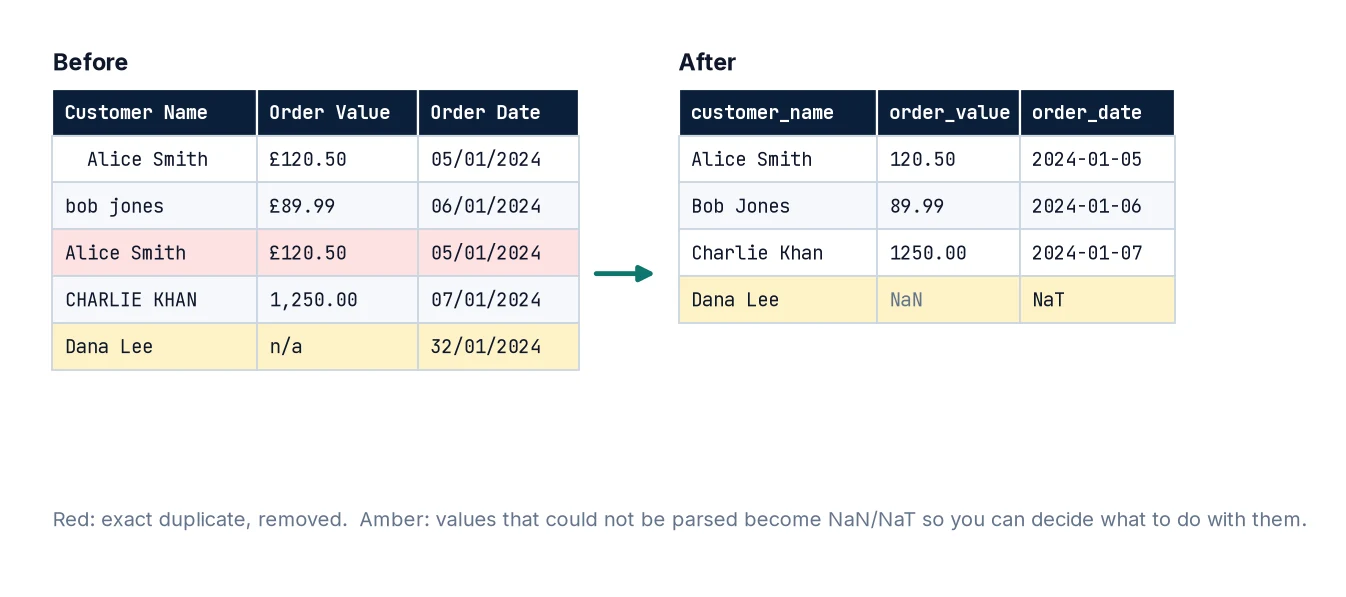
Here is a small customer-orders table with the kinds of problems you will meet in real exports:
import pandas as pd
import numpy as np

raw = pd.DataFrame({
    "Customer Name": ["  Alice Smith", "bob jones", "Alice Smith", "CHARLIE KHAN ", "Dana Lee", None],
    "City": ["London", "london", "London", "Manchester", "manchester ", "Leeds"],
    "Order Value": ["£120.50", "£89.99", "£120.50", "1,250.00", "n/a", "£45"],
    "Order Date": ["05/01/2024", "06/01/2024", "05/01/2024", "07/01/2024", "32/01/2024", "08/01/2024"],
    "Age": [34, 29, 34, -1, 41, 230],
})
print(raw)
Look at it for a minute and list the problems before reading on. Spotting issues yourself is the most valuable cleaning skill of all.
Step 1: Inspect before you change anything
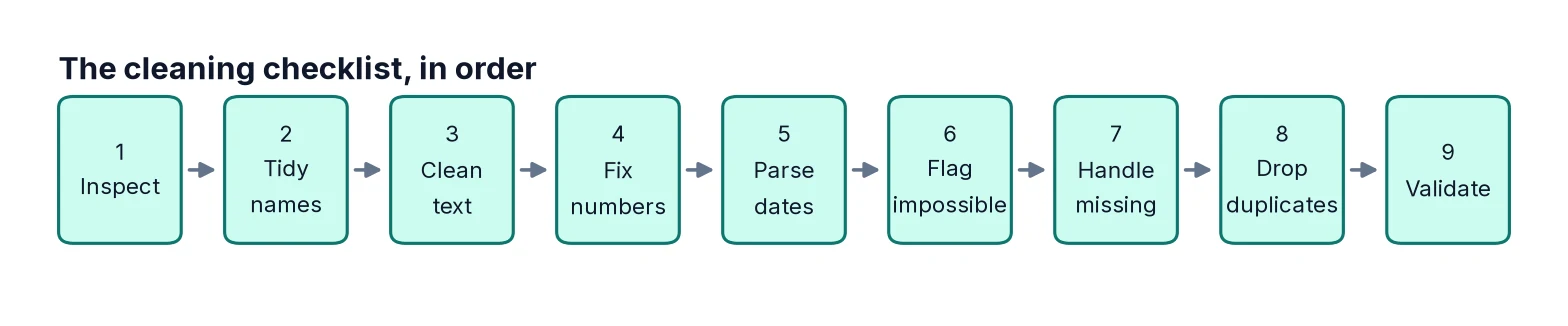
Never start cleaning blind. A few quick commands tell you most of what you need:
print(raw.shape)
print(raw.dtypes)
print(raw.isna().sum())
print(raw["City"].value_counts(dropna=False))
print(raw.describe())
From this we learn that Order Value and Order Date are text, City has variants of the same place (“London” and “london”), there is a missing name, and Age contains impossible values (−1 and 230). value_counts() on every text column is one of the quickest ways to find spelling variants.
Step 2: Work on a copy and tidy column names
Keep the raw data untouched so you can always compare and start again. Then make column names consistent: lower case, no spaces. This saves endless typing and avoids errors later.
df = raw.copy()
df.columns = (
    df.columns.str.strip()
              .str.lower()
              .str.replace(r"\s+", "_", regex=True)
)
print(df.columns.tolist())
Step 3: Clean text columns
Most text problems come down to whitespace and inconsistent capitalisation. pandas’ .str methods fix both in one line:
df["customer_name"] = df["customer_name"].str.strip().str.title()
df["city"] = df["city"].str.strip().str.title()
print(df[["customer_name", "city"]])
print(df["city"].value_counts())
Now there are just three cities. For genuine spelling variants (such as “Mancheste” or “Gt Manchester”), build an explicit mapping with df["city"].replace({"Mancheste": "Manchester"}). Explicit mappings are better than clever fuzzy matching for most business data, because you can see and review every change.
Step 4: Convert numbers stored as text
The order values contain pound signs, thousands separators and the placeholder “n/a”. Strip the symbols, then convert with pd.to_numeric. The errors="coerce" option turns anything that still cannot be converted into NaN rather than crashing:
df["order_value"] = (
    df["order_value"]
      .str.replace("£", "", regex=False)
      .str.replace(",", "", regex=False)
)
df["order_value"] = pd.to_numeric(df["order_value"], errors="coerce")
print(df["order_value"])
After coercion, always check what became missing. Coercion is powerful but it can hide problems if you do not look:
print(raw.loc[df["order_value"].isna(), "Order Value"])Here only “n/a” was lost, which is what we expected.
Step 5: Convert dates with an explicit format
The dates are UK day-first format. One of them, 32/01/2024, is impossible. Use an explicit format and coerce errors:
df["order_date"] = pd.to_datetime(df["order_date"], format="%d/%m/%Y", errors="coerce")
print(df["order_date"])
The invalid date becomes NaT (“not a time”), the date equivalent of NaN. If you omit the format, pandas may guess month-first for some rows and day-first for others, which is a subtle and serious error.
Step 6: Deal with impossible values
An age of −1 is probably a system code for “unknown”, and 230 is a typing error. Decide on a valid range and set values outside it to missing. Do not invent a replacement value without a reason.
valid_age = df["age"].between(0, 110)
print(df.loc[~valid_age, ["customer_name", "age"]])
df["age"] = df["age"].where(valid_age)  # out-of-range values become NaN
print(df["age"])
Write down the rules you apply (for example “ages outside 0–110 treated as missing”). Anyone using your results needs to know.
Step 7: Handle missing values deliberately
There is no single right way to handle missing values. The options are:
- Drop rows when the missing field is essential and the rows are few:
df.dropna(subset=["customer_name"]). - Fill with a sensible value when one exists, such as 0 for “number of complaints” when missing genuinely means none.
- Fill with a statistic such as the median – common in machine learning, but it reduces variability and can bias results.
- Leave as missing and let your analysis handle it. pandas functions like
.mean()skipNaNby default.
df = df.dropna(subset=["customer_name"])
df["age_filled"] = df["age"].fillna(df["age"].median())
print(df[["customer_name", "age", "age_filled"]])
Keeping the original column and adding a filled version, as above, makes it obvious which values were imputed.
Step 8: Remove duplicates
Alice Smith’s order appears twice with identical details. After cleaning text, duplicates that were hidden by spacing differences become visible, which is why de-duplication comes after text cleaning.
print(df.duplicated().sum())
df = df.drop_duplicates()
print(df)
Think about which columns define a duplicate. Two orders of the same value on the same day by the same customer might be a genuine repeat purchase. If you have an order ID, use drop_duplicates(subset=["order_id"]) and investigate any conflicts instead of dropping blindly.
Step 9: Validate the result
Finish with checks that would fail loudly if something were wrong. Simple assert statements work well:
assert df["customer_name"].notna().all()
assert df["order_value"].dropna().ge(0).all()
assert df["city"].isin(["London", "Manchester", "Leeds"]).all()
assert not df.duplicated().any()
print("All checks passed. Rows:", len(df))
print(df.dtypes)
Step 10: Wrap it in a function
Once the steps work, put them into a single function. Next month, when a new export arrives, you run one line rather than repeating manual work:
def clean_orders(raw):
    df = raw.copy()
    df.columns = df.columns.str.strip().str.lower().str.replace(r"\s+", "_", regex=True)
    df["customer_name"] = df["customer_name"].str.strip().str.title()
    df["city"] = df["city"].str.strip().str.title()
    df["order_value"] = pd.to_numeric(
        df["order_value"].str.replace(r"[£,]", "", regex=True), errors="coerce"
    )
    df["order_date"] = pd.to_datetime(df["order_date"], format="%d/%m/%Y", errors="coerce")
    df["age"] = df["age"].where(df["age"].between(0, 110))
    df = df.dropna(subset=["customer_name"]).drop_duplicates()
    return df

print(clean_orders(raw))
Common mistakes
- Cleaning in place without a copy. You lose the ability to compare before and after.
- De-duplicating before cleaning text. “Alice Smith” and “ Alice Smith” are different strings until you strip them.
- Using
errors="coerce"and never checking what became missing. - Filling every gap with the mean. It is quick, but it can distort distributions and hide data-quality problems.
- Fixing problems by hand in Excel. Manual edits are not repeatable or auditable; code is.
- Not recording assumptions. Every rule you apply changes the results. Write it down.
FAQ
Should I clean data in Excel or Python?
For a one-off small file, Excel or Power Query is fine. For anything repeated or larger, code is more reliable. See Excel vs Python: When to Use Which and Cleaning Data with Power Query.
What is the difference between NaN, None and NaT?
NaN is the floating-point “missing” marker, None is Python’s general null, and NaT is pandas’ missing datetime. isna() detects all three.
How do I find outliers automatically?
A common rule flags values more than 1.5 × the interquartile range beyond the quartiles. Treat it as a prompt to investigate, not a rule to delete.
Should I remove outliers before machine learning?
Only if they are errors. Genuine extreme values carry information. Also, do any data-driven cleaning using the training set only – see Train/Test Split Explained.
Next steps
If your data has not been loaded properly yet, start with How to Read CSV Files in Pandas. Once it is clean, summarise it with pandas groupby, combine it with other tables using pandas merge, and turn it into model-ready inputs with Feature Engineering Basics.