Every serious AI application – a chatbot that answers from company documents, a product search that understands meaning, a support tool that finds similar tickets – depends on one capability: finding the items most similar to a query, quickly, among thousands or millions of candidates. Vector databases exist to do exactly that.
This guide explains what a vector database actually stores, how similarity search works, and why approximate indexes such as HNSW make it fast. You will build a tiny vector search from scratch in Python so the ideas are concrete, then see how the same thing looks in pgvector (PostgreSQL) and Chroma. Finally, there is a practical checklist for choosing between the main options.
If you have read Build a Simple RAG Pipeline in Python, you have already seen retrieval with TF-IDF. Vector databases are what you reach for when that retrieval needs to understand meaning and scale beyond a few documents.
What is a vector, and what is an embedding?
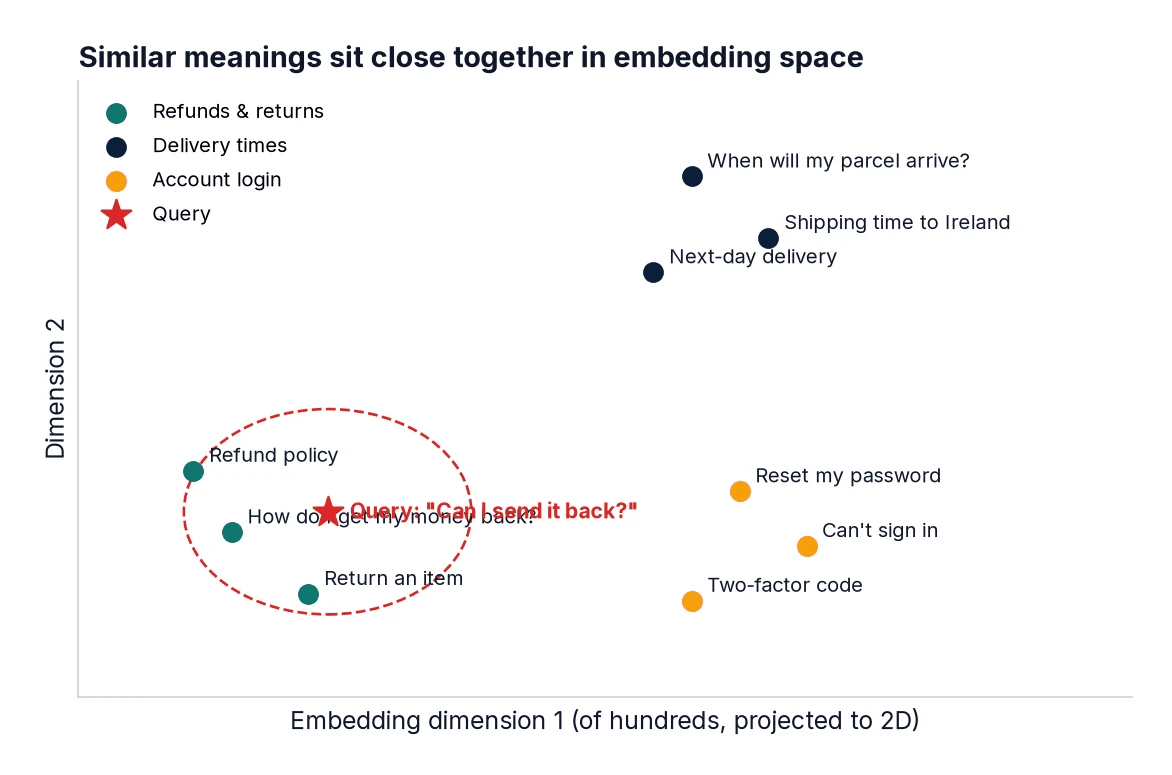
A vector is just a list of numbers, such as [0.12, -0.48, 0.91, ...]. An embedding is a vector produced by a model so that items with similar meaning end up close together. An embedding model might turn “How do I reset my password?” and “I forgot my login details” into vectors that point in nearly the same direction, even though the sentences share almost no words.
Typical text embedding models output between 384 and 3,072 numbers per item. Images, audio and even rows in a table can be embedded too.
Three distance measures dominate:
| Measure | What it compares | Typical use |
|---|---|---|
| Cosine similarity | The angle between vectors (ignores length) | Most text embeddings |
| Dot product | Angle and length together | Models trained for it; equals cosine when vectors are normalised |
| Euclidean (L2) distance | Straight-line distance | Some image models, clustering |
If your vectors are normalised to length 1, cosine similarity and dot product give the same ranking, and many systems normalise for that reason.
A vector search from scratch
The simplest possible vector search compares the query with every stored vector and keeps the best matches. This “brute force” or “flat” search is exact and, for a few thousand items, perfectly fast. To keep the demo free and offline we will create vectors with TF-IDF followed by truncated SVD (a classic technique called latent semantic analysis), which captures some meaning beyond exact words.
import numpy as np
from sklearn.feature_extraction.text import TfidfVectorizer
from sklearn.decomposition import TruncatedSVD
from sklearn.pipeline import make_pipeline
from sklearn.preprocessing import Normalizer

docs = [
    "Reset your password from the account settings page.",
    "You can change your login credentials under Settings > Security.",
    "Refunds are paid back to the original card within 5 working days.",
    "We return money to your payment method once the item arrives back.",
    "Standard delivery takes 3 to 5 working days in the UK.",
    "Next-day shipping is available for orders placed before 2pm.",
    "Our warranty covers manufacturing faults for 24 months.",
    "Accidental damage is not included in the standard guarantee.",
]

embedder = make_pipeline(
    TfidfVectorizer(stop_words="english"),
    TruncatedSVD(n_components=5, random_state=0),
    Normalizer(),                       # unit length, so dot product = cosine
)
vectors = embedder.fit_transform(docs)
print(vectors.shape)                    # (8, 5): 8 documents, 5 dimensions

def search(query, k=3):
    q = embedder.transform([query])[0]
    scores = vectors @ q                # cosine similarity with every document
    top = np.argsort(scores)[::-1][:k]
    return [(round(float(scores[i]), 3), docs[i]) for i in top]

for hit in search("how long until I get my money back"):
    print(hit)
Real projects swap the TF-IDF/SVD pipeline for a neural embedding model, such as an open-source sentence-transformers model run locally or a hosted embeddings API. Everything else – storing vectors, comparing them and returning the closest – stays the same.
Why brute force stops scaling
Brute-force search costs one comparison per stored vector for every query. With 10 million vectors of 1,024 dimensions, that is about 10 billion multiply-adds per query. It works, but it is too slow for an interactive app with many users. Let us measure it:
import time

rng = np.random.default_rng(0)
for n in [10_000, 100_000, 500_000]:
    store = rng.standard_normal((n, 384)).astype("float32")
    store /= np.linalg.norm(store, axis=1, keepdims=True)
    query = store[123]
    t0 = time.perf_counter()
    for _ in range(20):
        top = np.argpartition(store @ query, -10)[-10:]
    ms = (time.perf_counter() - t0) / 20 * 1000
    print(f"{n:>9,} vectors: {ms:6.1f} ms per query")
On a typical laptop this takes a fraction of a millisecond for 10,000 vectors and several milliseconds for 500,000 – and the time grows linearly. At tens of millions of vectors you are into hundreds of milliseconds per query per CPU core, before any filtering or concurrent users. Vector databases solve this with approximate nearest neighbour (ANN) indexes that skip most comparisons while still finding nearly all true matches.
How ANN indexes work: HNSW and IVF
The two families you will meet most often are:
- HNSW (Hierarchical Navigable Small World). Vectors become nodes in a layered graph, each connected to its near neighbours. A search starts at a sparse top layer, greedily hops towards the query, then drops down to denser layers to refine. It typically checks a few thousand vectors instead of millions. HNSW is fast and accurate but uses extra memory for the graph.
- IVF (inverted file index). Vectors are clustered with k-means into, say, 1,000 lists. A query is compared with the cluster centres, and only the closest few lists (the
nprobesetting) are searched. IVF uses less memory but needs training and careful tuning.
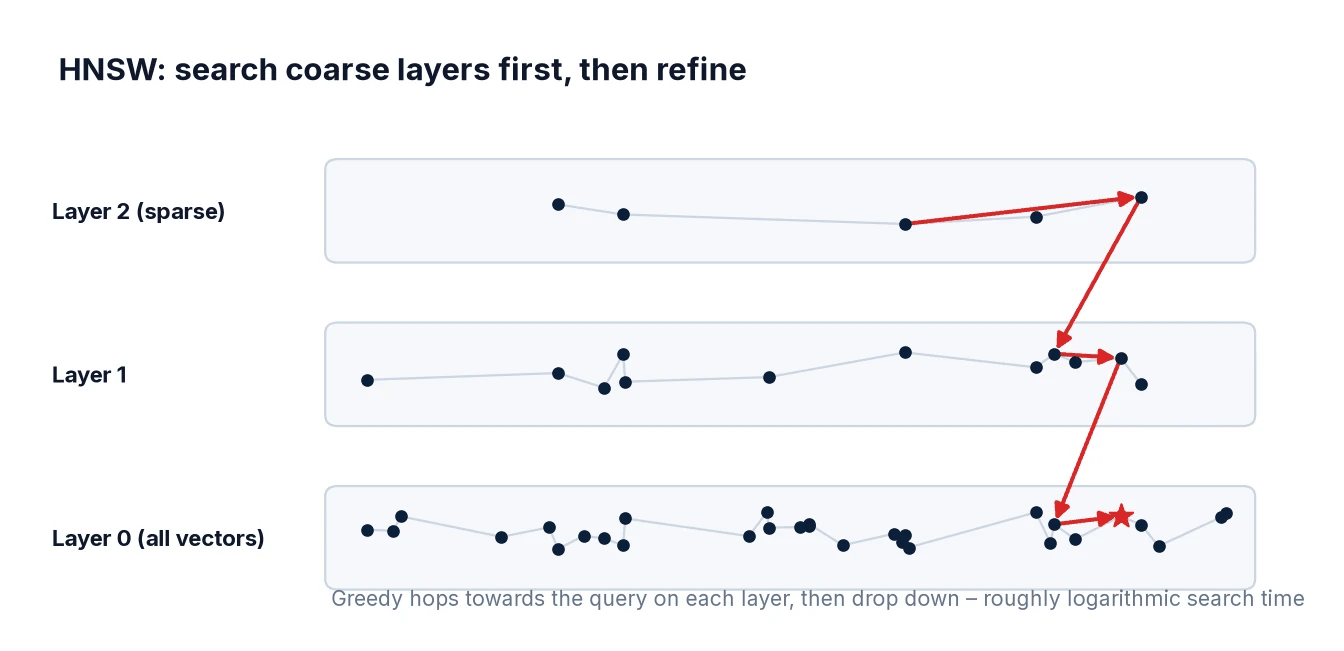
Both trade a little accuracy for a lot of speed. Accuracy is measured as recall@k: of the true top-k neighbours (from brute force), what fraction did the index return? Production systems usually aim for 0.95 or higher and tune parameters such as ef_search (HNSW) or nprobe (IVF) to hit that target at an acceptable latency.
What a vector database adds beyond an index
An index library such as FAISS or hnswlib gives you fast search. A vector database wraps that in everything an application needs:
- Storage and persistence – vectors survive restarts and can be backed up.
- Metadata filtering – “find similar documents, but only from the HR policy collection, written after 2025”.
- CRUD operations – insert, update and delete without rebuilding the whole index.
- Hybrid search – combining vector similarity with keyword (BM25) scores, which often beats either alone.
- Scaling and access control – sharding, replication, authentication and multi-tenancy.
Example 1: pgvector in PostgreSQL
If you already run PostgreSQL, the pgvector extension is often the most sensible first choice: your vectors live next to your ordinary tables, and you query them with SQL.
CREATE EXTENSION IF NOT EXISTS vector;

CREATE TABLE help_articles (
    id         bigserial PRIMARY KEY,
    title      text NOT NULL,
    body       text NOT NULL,
    category   text,
    embedding  vector(384)
);

-- Approximate index for cosine distance
CREATE INDEX ON help_articles USING hnsw (embedding vector_cosine_ops);

-- Five nearest articles in the 'billing' category
SELECT id, title, 1 - (embedding <=> $1) AS cosine_similarity
FROM help_articles
WHERE category = 'billing'
ORDER BY embedding <=> $1
LIMIT 5;
The <=> operator is cosine distance (so 1 minus it is similarity); <-> is Euclidean distance and <#> is negative inner product. From Python you would pass the query embedding as the $1 parameter using a driver such as psycopg with the pgvector adapter.
Example 2: Chroma for local prototypes
Chroma is a popular open-source vector store for prototypes and small applications. It can embed text for you with a default local model:
# needs: pip install chromadb (downloads a small embedding model on first use)
import chromadb

client = chromadb.PersistentClient(path="./chroma_db")
collection = client.get_or_create_collection(
    name="help_articles", metadata={"hnsw:space": "cosine"}
)
collection.add(
    ids=[f"doc{i}" for i in range(len(docs))],
    documents=docs,
    metadatas=[{"topic": t} for t in
               ["account", "account", "refunds", "refunds",
                "delivery", "delivery", "warranty", "warranty"]],
)
result = collection.query(
    query_texts=["when will my money come back?"],
    n_results=2,
    where={"topic": "refunds"},
)
print(result["documents"])
How to choose a vector database
| Option | Type | Best for | Watch out for |
|---|---|---|---|
| pgvector (PostgreSQL) | Extension | Teams already on Postgres; up to tens of millions of vectors | Tuning memory and index build time at large scale |
| Chroma | Open source, embedded or server | Prototypes, notebooks, small apps | Fewer enterprise features |
| Qdrant | Open source + managed cloud | Strong filtering, self-hosting, good performance | Another service to operate |
| Weaviate | Open source + managed cloud | Built-in hybrid search and modules | More concepts to learn |
| Milvus / Zilliz | Open source + managed cloud | Very large collections, GPU indexes | Heavier to run yourself |
| Pinecone | Fully managed | No infrastructure work, fast to production | Usage-based cost, vendor lock-in |
| Cloud warehouses (BigQuery, Snowflake, Databricks) | Built-in vector functions | Search over data already in the warehouse | Higher latency than dedicated stores |
A good rule: start with what you already operate. If your data is in Postgres, try pgvector. If you have nothing yet and need a quick prototype, use Chroma. Move to a dedicated or managed service when scale, latency or multi-tenancy requirements genuinely demand it – and measure first.
Common pitfalls
- Mixing embedding models. Vectors from different models (or versions) are not comparable. Store the model name with every vector and re-embed everything when you change models.
- Ignoring chunking. Embedding a 40-page PDF as one vector blurs its meaning. Split documents into sections of a few hundred tokens with some overlap.
- Skipping evaluation. Build a small set of questions with known correct documents and track recall@k whenever you change chunking, models or index settings.
- Over-engineering early. Under about 100,000 vectors, brute force in NumPy or pgvector without an index is often fast enough.
- Forgetting filters. Restricting results by metadata (customer, language, date) often matters more for quality than the choice of database.
FAQ
Do I need a vector database for RAG?
Not always. For a few thousand chunks, an in-memory NumPy array or a pgvector table without an index works fine. You need a proper vector database when the collection, query volume or filtering requirements grow.
What embedding dimension should I use?
Use what your chosen model produces. Higher dimensions can capture more nuance but cost more storage and compute. Some modern models let you truncate vectors (for example from 1,536 to 512) with only a small quality loss – test it on your own evaluation set.
Are vector databases only for text?
No. Any data you can embed – images, audio, products, user behaviour – can be searched the same way.
How is this different from keyword search?
Keyword search matches words; vector search matches meaning. Hybrid search combines both and is usually the strongest option for documents with product codes, names or jargon.
Next steps
Take the from-scratch search above, swap in a real embedding model, and plug it into the retrieval step of your RAG pipeline. Then build a small evaluation set – the habits in AI Hallucinations: How to Check AI Outputs apply just as much to retrieval quality as to model answers.