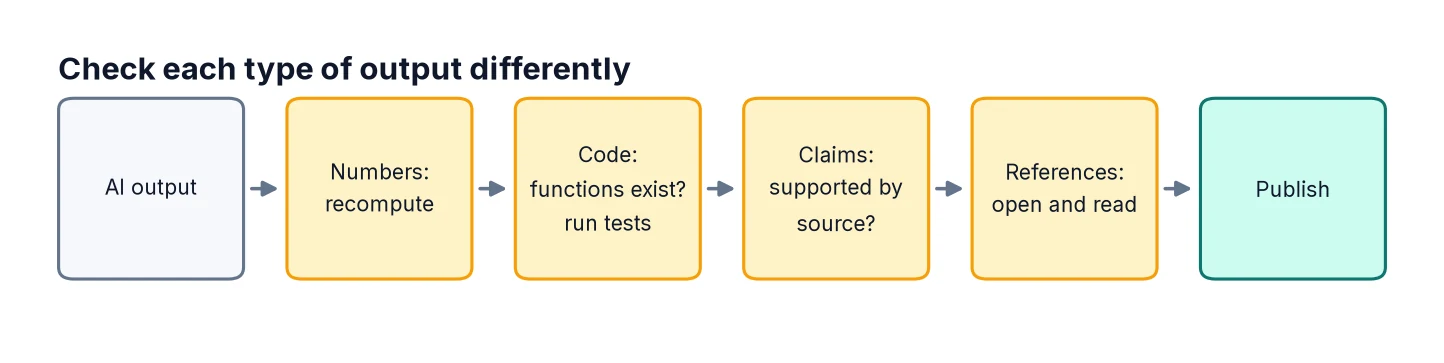
AI language models write fluent, confident text – and sometimes that text is wrong. They can invent statistics, cite papers that do not exist, misquote a source, describe library functions that were never written or get a calculation subtly wrong. These errors are usually called hallucinations. For anyone using AI in data work, the key skill is not avoiding AI but knowing how to check what it produces.
This guide explains why hallucinations happen, the types you are most likely to meet in data analysis, and practical checks – manual and automated in Python – that catch them before they reach a report or a decision.
Why hallucinations happen
A language model generates text by repeatedly predicting likely next tokens based on patterns learned from training data. It does not look facts up in a database unless it is connected to tools such as search or your documents, and even then it can misread or misstate them. When the model lacks the information, the most “likely-sounding” continuation may be a plausible fabrication. Fluency is not evidence of accuracy.
Risk is higher when you ask about:
- specific numbers, dates, names and citations;
- recent events or new library versions;
- niche topics with little training data;
- your own data, which the model has not seen;
- multi-step arithmetic done “in its head”.
Types you will meet in data work
- Fabricated facts and figures: “UK e-commerce grew 14% last year” with no source.
- Fake references: realistic-looking paper titles, authors or URLs that do not exist.
- Non-existent code: functions, parameters or packages that are invented or belong to a different version.
- Misreading supplied data: wrong totals, swapped columns, trends that are not there.
- Unsupported reasoning: confident causal claims (“sales fell because of the price rise”) from data that cannot show causation.
- Summary drift: a summary that adds details or changes numbers from the source.
Step 1: Reduce risk with how you ask
- Provide the source material and ask the model to answer only from it.
- Ask it to say “not stated in the text” when the answer is not there.
- Ask for quotes or references to specific passages for each claim.
- Let code do the maths: ask the model to write pandas or SQL, then run it yourself.
- Break big tasks into smaller, checkable steps.
These reduce errors but do not eliminate them. Checking is still essential. Prompt templates are in ChatGPT Prompts for Data Analysis.
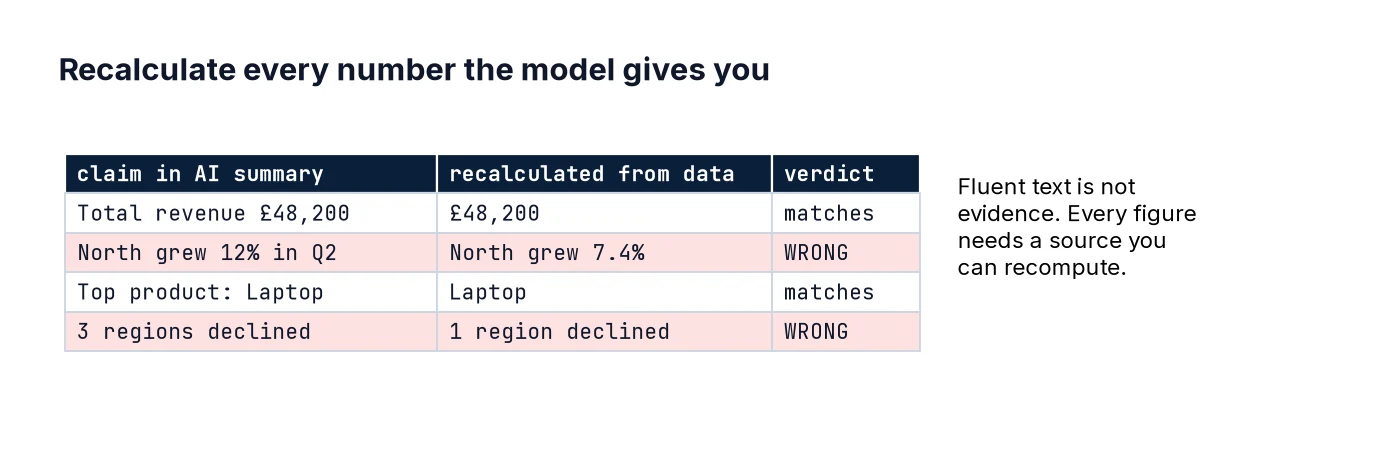
Step 2: Recalculate every number from the data
If an AI tool describes your data, verify each figure with code. Suppose a model was given this sales table and wrote the claims below:
import pandas as pd

sales = pd.DataFrame({
    "region": ["North", "North", "South", "South", "East", "East"],
    "month": ["Jan", "Feb", "Jan", "Feb", "Jan", "Feb"],
    "revenue": [12000, 13800, 15500, 14900, 9800, 11760],
})

ai_claims = {
    "total_revenue": 77760,
    "best_region": "South",
    "north_growth_pct": 15.0,
    "east_growth_pct": 25.0,
}

pivot = sales.pivot(index="region", columns="month", values="revenue")
actual = {
    "total_revenue": int(sales["revenue"].sum()),
    "best_region": sales.groupby("region")["revenue"].sum().idxmax(),
    "north_growth_pct": round((pivot.loc["North", "Feb"] / pivot.loc["North", "Jan"] - 1) * 100, 1),
    "east_growth_pct": round((pivot.loc["East", "Feb"] / pivot.loc["East", "Jan"] - 1) * 100, 1),
}

for key in ai_claims:
    status = "OK" if ai_claims[key] == actual[key] else "MISMATCH"
    print(f"{key:18s} claimed={ai_claims[key]!s:8s} actual={actual[key]!s:8s} {status}")
Three claims are correct, but East’s growth was 20%, not 25%. Without a check, that error would go straight into a slide. The general pattern – list the claims, compute each one independently, compare – works for any analysis. See GroupBy Explained for the aggregation techniques used here.
Step 3: Check that generated code uses real functions
Before running unfamiliar AI-written code, confirm that the functions and parameters exist in your installed versions:
import importlib, inspect

def api_exists(dotted_name, param=None):
    module_name, _, attr = dotted_name.rpartition(".")
    try:
        obj = getattr(importlib.import_module(module_name), attr)
    except (ImportError, AttributeError):
        return False
    if param is None:
        return True
    try:
        return param in inspect.signature(obj).parameters
    except (TypeError, ValueError):
        return False

print(api_exists("pandas.read_csv", "usecols"))        # real
print(api_exists("pandas.read_csv", "auto_clean"))     # invented parameter
print(api_exists("pandas.smart_merge"))                # invented function
This catches invented APIs instantly. It does not prove the code is correct, so follow it with tests on a small dataset where you know the answer, as described in AI Coding Assistants for Data Science.
Step 4: Check that answers are supported by the source
When a model answers from a document, check each sentence against the text. A simple automated screen compares the words in each claim with the source and flags claims with low overlap or unsupported numbers:
import re

source = ("The trial ran for 12 weeks with 240 participants. "
          "The new process reduced average handling time from 11 minutes to 8 minutes. "
          "Customer satisfaction did not change significantly.")

answer = ("The 12-week trial with 240 participants cut handling time from 11 to 8 minutes. "
          "Customer satisfaction improved by 10 per cent. "
          "The process will be rolled out nationally in 2025.")

def tokens(text):
    return set(re.findall(r"[a-z0-9]+", text.lower()))

def support_report(answer, source, threshold=0.6):
    src = tokens(source)
    src_numbers = set(re.findall(r"\d+", source))
    for sent in re.split(r"(?<=\.)\s+", answer.strip()):
        words = tokens(sent)
        overlap = len(words & src) / max(len(words), 1)
        bad_numbers = set(re.findall(r"\d+", sent)) - src_numbers
        flag = "CHECK" if overlap < threshold or bad_numbers else "ok"
        print(f"[{flag}] overlap={overlap:.2f} new numbers={sorted(bad_numbers)} :: {sent}")

support_report(answer, source)
The first sentence is supported. The second contradicts the source (satisfaction did not change) and introduces a new number; the third invents a rollout and a year. Word overlap is a crude measure – it can miss a negation or a subtle change of meaning – so treat flags as prompts for human review, not as a verdict. More sophisticated approaches use a second model or a dedicated fact-checking model to judge support, but they also need validating.
Step 5: Verify references and external facts
- Citations: search for the exact title, check the authors and year, and open the source. Never cite a paper you have not seen.
- Statistics: find the original publisher, such as the Office for National Statistics, and check the definition, date and geography.
- Library behaviour: check the official documentation for your installed version.
- Legal, medical or financial claims: rely on authoritative sources and qualified professionals, not AI output.
Step 6: Build checking into workflows
For repeated AI use – classifying comments, summarising documents, extracting fields – set up a proper evaluation:
- Create a test set of examples with correct answers labelled by a person.
- Measure accuracy (and precision/recall where relevant – see Classification Metrics Explained).
- Run automated checks on every output: valid format, allowed values, numbers present in source.
- Manually review a random sample regularly, as well as everything flagged.
- Re-run the evaluation when you change the prompt or model.
Grounding answers in retrieved documents also helps; see Build a Simple RAG Pipeline in Python.
Common mistakes
- Assuming confidence means correctness.
- Asking the model to do arithmetic instead of writing code to do it.
- Asking “are you sure?” and treating the reply as verification. The model may simply agree or apologise.
- Checking only the first few outputs of a large batch.
- Publishing AI-generated statistics or citations without finding the original source.
FAQ
Can hallucinations be eliminated completely?
Not with current technology. Grounding, better prompts and newer models reduce them, but verification remains necessary.
Are some tasks safer than others?
Yes. Rewording, formatting and drafting code you will test are lower risk. Facts, figures, citations and decisions about people are higher risk.
Does connecting AI to web search fix the problem?
It helps with recent facts, but models can still misread or misattribute sources. Open the cited pages yourself.
Next steps
Apply these checks in Summarising Text with an LLM in Python and Calling an LLM API from Python.