AI coding assistants – chat tools and editor plug-ins that write, explain and fix code – have become part of everyday data work. Used well, they save time on boilerplate, unfamiliar syntax and debugging. Used carelessly, they produce code that runs without errors but quietly gives the wrong answer, which in data science is the worst kind of bug.
This guide is tool-agnostic. It covers what assistants are good and bad at for data tasks, how to write requests that get useful code, and – most importantly – a practical routine for checking generated code before you trust its output. Product features change quickly, so check your own tool’s documentation for specifics.
What AI assistants are good at in data work
- Syntax you half-remember: pandas reshaping, regular expressions, date formatting, matplotlib options, SQL window functions.
- Translating between tools: an Excel formula into pandas, a pandas operation into SQL, R into Python.
- Explaining unfamiliar code line by line.
- Interpreting error messages and suggesting likely causes.
- Boilerplate: argument parsing, plotting templates, test scaffolding, docstrings.
- Refactoring a long notebook cell into functions.
Where they go wrong
- Invented functions or parameters that look plausible but do not exist, or that existed in an older library version.
- Silent logic errors: wrong join type, mean instead of weighted mean, off-by-one date ranges, dropping missing values without saying so.
- Assumptions about your data: column names, types and uniqueness that are not true.
- Statistical mistakes: leakage in model pipelines, inappropriate tests, overconfident interpretation.
- Outdated practices, because training data lags behind library releases.
The common thread: assistants do not see your data or run your code unless your tool is specifically set up to do so, and even then, the result needs checking. Our guide to AI hallucinations covers this in more depth.
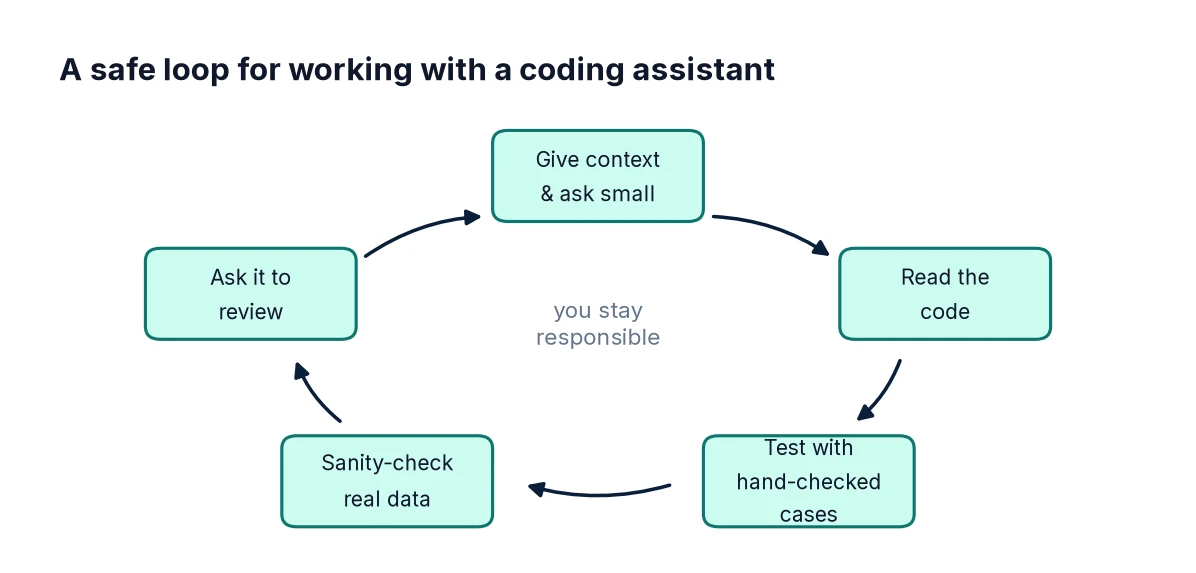
Step 1: Give the assistant real context
Most poor answers come from vague requests. Include:
- The schema: column names, data types and a few sample rows (anonymised or synthetic – never paste personal or confidential data into a tool your organisation has not approved).
- Library versions, e.g. “pandas 2.x”.
- The exact goal and edge cases: “customers with no orders should appear with 0”.
- Constraints: “no loops”, “must work in SQLite”, “explain each step”.
Printing a compact description of a DataFrame gives the assistant what it needs without exposing real records:
import pandas as pd
import numpy as np

orders = pd.DataFrame({
    "order_id": [1, 2, 3, 4, 5],
    "customer_id": [10, 10, 11, 12, 12],
    "order_date": pd.to_datetime(["2024-01-03", "2024-02-11", "2024-01-20", "2024-03-02", "2024-03-15"]),
    "amount": [25.0, 40.5, np.nan, 12.0, 60.0],
})

def describe_for_prompt(df, n=3):
    lines = [f"DataFrame with {len(df)} rows. Columns:"]
    for col, dtype in df.dtypes.items():
        lines.append(f"- {col} ({dtype}), {df[col].isna().sum()} missing, {df[col].nunique()} unique")
    lines.append("Sample rows:")
    lines.append(df.head(n).to_string(index=False))
    return "\n".join(lines)

print(describe_for_prompt(orders))
Paste that into your request along with the goal. For more prompt structures, see ChatGPT Prompts for Data Analysis.
Step 2: Ask for small, testable pieces
Requesting “the whole analysis” produces a long script that is hard to review. Ask for one function at a time with a clear input and output: “Write a function monthly_revenue(orders) returning one row per month with total amount, treating missing amounts as 0.” Small functions are easy to read and easy to test.
Step 3: Read the code before running it
Check, in particular:
- Every join: type (inner/left) and keys. See Pandas Merge and Join.
- Every filter and
dropna: what rows disappear? - Aggregations: sum vs mean vs count, and what happens to missing values.
- Any function or parameter you do not recognise – look it up in the official documentation.
- Anything that writes, deletes or overwrites files or database tables.
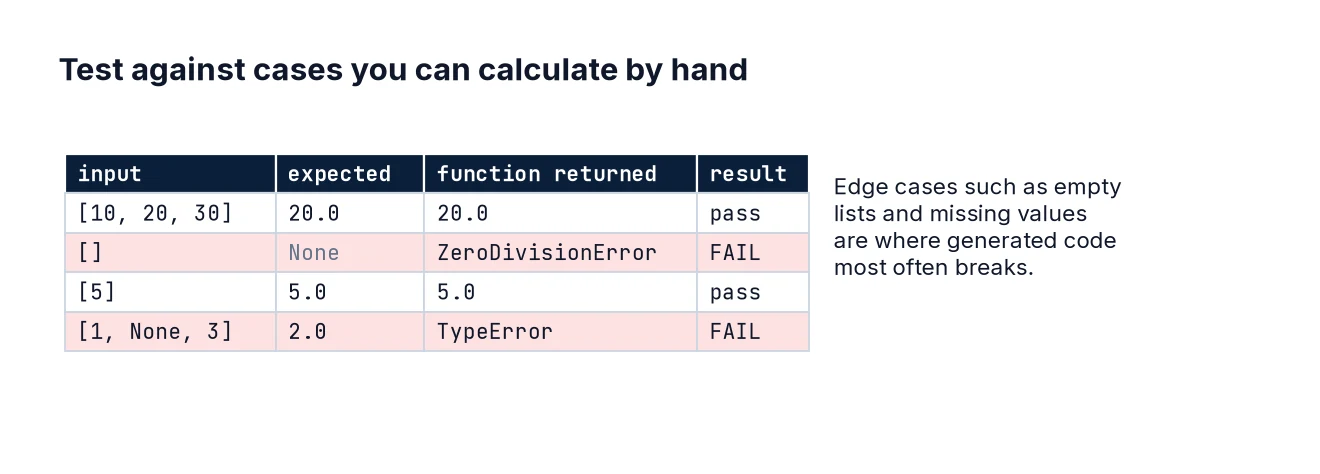
Step 4: Test against cases you can calculate by hand
This is the single most valuable habit. Build a tiny dataset where you know the right answer, and assert it. Suppose an assistant produced this function:
def monthly_revenue(df):
    out = (df.assign(month=df["order_date"].dt.to_period("M"),
                     amount=df["amount"].fillna(0))
             .groupby("month", as_index=False)["amount"].sum())
    return out

result = monthly_revenue(orders)
print(result)

expected = {"2024-01": 25.0, "2024-02": 40.5, "2024-03": 72.0}
got = {str(m): a for m, a in zip(result["month"], result["amount"])}
assert got == expected, got
print("Hand-checked totals match")
January contains 25.0 plus a missing amount (treated as 0), February 40.5, March 12 + 60. If the assistant had used an inner join, dropped NaN rows in a way that removed a month, or grouped by day by mistake, the assertion would fail immediately.
Step 5: Add sanity checks on real data
Once code runs on the full dataset, compare against independent figures:
def check_totals(raw, summary, raw_col="amount", sum_col="amount"):
    raw_total = raw[raw_col].fillna(0).sum()
    summary_total = summary[sum_col].sum()
    assert np.isclose(raw_total, summary_total), (raw_total, summary_total)
    return raw_total

print("Grand total preserved:", check_totals(orders, monthly_revenue(orders)))
Row counts before and after joins, totals before and after aggregation, and a spot check of a few individual records will catch most silent errors. The same thinking appears in Cleaning Messy Data with Pandas.
Step 6: Use the assistant to review, not just write
Assistants are useful critics. Paste your own code and ask: “What edge cases could break this? Where might rows be lost or duplicated? Is there any data leakage?” Treat the answers as suggestions to investigate, not verdicts.
Another productive pattern is asking for tests: “Write pytest tests for this function, including empty input, missing values and duplicate keys.” Then check that the tests themselves are correct – an assistant can write a test that asserts the wrong expected value.
Step 7: Debugging with an assistant
When you hit an error, share the full traceback, the relevant code and the output of df.dtypes and df.head(). Ask for an explanation of the cause before the fix, so that you learn the pattern. If the suggested fix changes behaviour (for example adding errors="coerce", which turns bad values into NaN), make sure you understand what data is affected.
Privacy, security and licensing
- Follow your organisation’s policy on which AI tools are approved and what data may be shared.
- Never paste passwords, API keys or connection strings. Keep secrets in environment variables.
- Do not share personal data (names, emails, health or financial records) with external tools unless it is approved and lawful under UK GDPR.
- Be cautious with generated code that installs packages, makes network calls or deletes files.
Common mistakes
- Trusting code because it runs. No error does not mean correct output.
- Not giving the schema, then getting code with invented column names.
- Accepting large scripts in one go instead of small reviewable functions.
- Skipping hand-checked tests on a tiny dataset.
- Pasting sensitive data into unapproved tools.
- Letting skills fade: if you cannot explain the code, you cannot maintain it.
FAQ
Will AI assistants replace data analysts?
They change the work rather than remove the need for judgement. Knowing what question to ask, understanding the data and checking results remain human responsibilities.
Should beginners use them?
Yes, as a tutor: ask for explanations, then write the code yourself or retype it line by line. Copying code you do not understand slows learning.
Which assistant is best?
Capabilities change frequently, so compare current tools on your own typical tasks, using the testing routine above as the benchmark.
Next steps
Learn to spot fabricated answers in AI Hallucinations: How to Check Outputs, and try calling a model from your own code with LLM APIs in Python.