

Data rarely arrives in one tidy table. Orders sit in one file, customer details in another, and product prices in a third. To analyse them together you need to combine them, and in pandas the main tool for that is merge. It works much like a SQL join or an Excel lookup, but with a few behaviours of its own that can quietly duplicate or drop rows if you are not careful.
This tutorial covers how merge works, the four join types, merging on differently named or multiple columns, the validate and indicator options that protect you from mistakes, and when to use concat or join instead. Every example builds its own small DataFrames, so you can run it straight away.
Sample data
import pandas as pd

customers = pd.DataFrame({
    "customer_id": [1, 2, 3, 4],
    "name": ["Ava", "Ben", "Chloe", "Dan"],
    "city": ["London", "Bristol", "Leeds", "York"],
})
orders = pd.DataFrame({
    "order_id": [101, 102, 103, 104, 105],
    "customer_id": [1, 1, 2, 3, 9],
    "amount": [120.0, 35.5, 80.0, 210.0, 15.0],
})
print(customers, orders, sep="\n\n")
As in our SQL joins guide, Dan has no orders and order 105 belongs to a customer (9) who is not in the customer table. Those two gaps show how each join type behaves.
Step 1: A basic inner merge
inner = orders.merge(customers, on="customer_id")
print(inner)
By default merge performs an inner join: only rows with a matching customer_id in both tables are kept. The result has four rows. Dan is missing (no orders) and order 105 is missing (no customer). Dropping rows silently like this is the most common merge surprise, so always check row counts.
Step 2: Choose the join type with how
left = orders.merge(customers, on="customer_id", how="left")
print(left)            # all 5 orders; order 105 has NaN name and city

right = orders.merge(customers, on="customer_id", how="right")
print(right)           # all 4 customers; Dan has NaN order details

outer = orders.merge(customers, on="customer_id", how="outer")
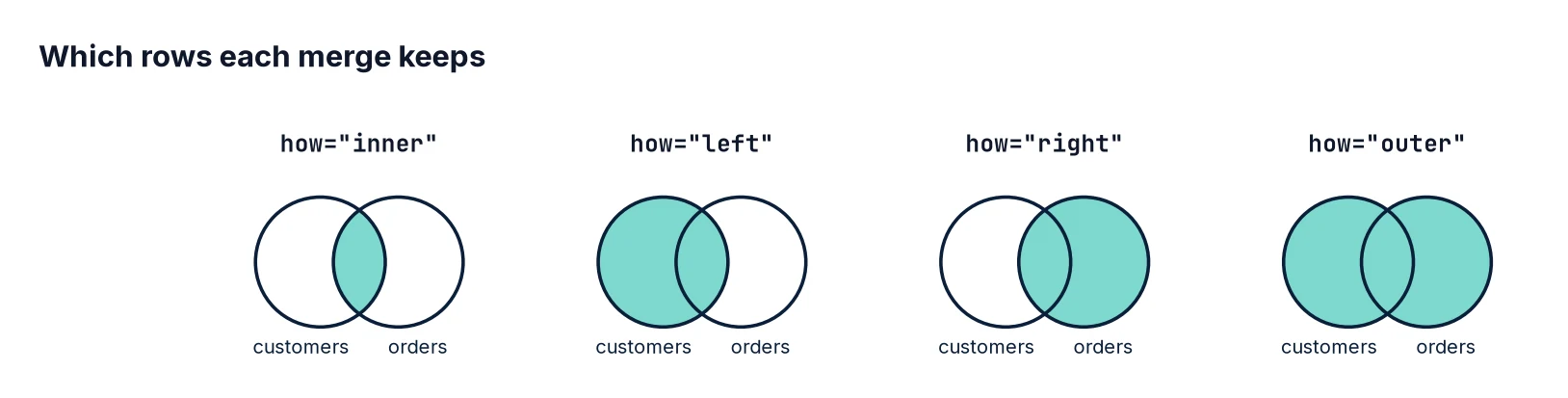
print(outer) # everything from both sideshow="inner"– only matches (default).how="left"– every row from the left DataFrame (the one you call.mergeon).how="right"– every row from the right DataFrame.how="outer"– every row from both.
In analysis, how="left" is the most common choice: you start from the main table, such as orders, and enrich it with extra columns without losing any rows.
Step 3: Find unmatched rows with indicator
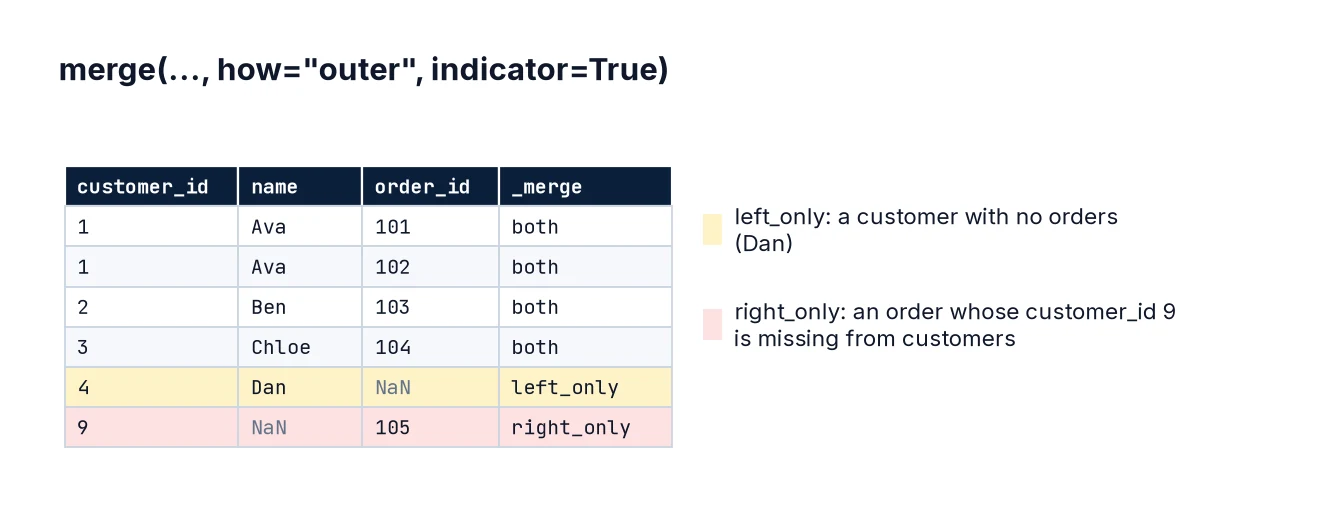
The indicator=True option adds a _merge column saying where each row came from. It is the quickest way to audit a merge:
audit = orders.merge(customers, on="customer_id", how="outer", indicator=True)
print(audit["_merge"].value_counts())
print(audit[audit["_merge"] != "both"])
The values are both, left_only and right_only. Here, order 105 is left_only (an orphan order, probably a data-quality issue worth reporting) and Dan is right_only (a customer with no orders). This is also how you do an “anti-join” in pandas: filter on left_only.
Step 4: Protect yourself with validate
If the key you merge on is not unique when you think it is, rows multiply. Suppose the customer table accidentally contains Ava twice:
dup_customers = pd.concat([customers, customers.iloc[[0]]], ignore_index=True)
bad = orders.merge(dup_customers, on="customer_id", how="left")
print(len(orders), "orders became", len(bad), "rows")
Five orders have become seven rows, and any revenue total is now inflated. The validate parameter turns this silent error into a loud one:
try:
    orders.merge(dup_customers, on="customer_id", how="left", validate="many_to_one")
except pd.errors.MergeError as e:
    print("Caught:", e)
Options are "one_to_one", "one_to_many", "many_to_one" and "many_to_many". When enriching a fact table (orders) with a lookup table (customers), "many_to_one" is the one you want. Adding it costs nothing and catches a serious class of bugs.
Step 5: Merge on differently named columns
Keys often have different names in different systems. Use left_on and right_on:
crm = customers.rename(columns={"customer_id": "cust_ref"})
m = orders.merge(crm, left_on="customer_id", right_on="cust_ref", how="left")
print(m.columns.tolist())
m = m.drop(columns="cust_ref")
Both key columns are kept in the result, so drop the duplicate afterwards.
Step 6: Merge on several columns
Sometimes a row is identified by a combination, such as store and date. Pass a list:
sales = pd.DataFrame({
    "store": ["Leeds", "Leeds", "York"],
    "date": pd.to_datetime(["2024-03-01", "2024-03-02", "2024-03-01"]),
    "revenue": [500, 620, 410],
})
weather = pd.DataFrame({
    "store": ["Leeds", "Leeds", "York"],
    "date": pd.to_datetime(["2024-03-01", "2024-03-02", "2024-03-01"]),
    "rain_mm": [2.5, 0.0, 6.1],
})
print(sales.merge(weather, on=["store", "date"], how="left", validate="one_to_one"))
Step 7: Handle overlapping column names
If both tables have a non-key column with the same name, pandas adds suffixes _x and _y. Give them meaningful names instead:
targets = pd.DataFrame({"store": ["Leeds", "York"], "revenue": [1000, 500]})
actual = sales.groupby("store", as_index=False)["revenue"].sum()
comp = actual.merge(targets, on="store", suffixes=("_actual", "_target"))
comp["vs_target"] = comp["revenue_actual"] - comp["revenue_target"]
print(comp)
Step 8: Make sure key types match
A key stored as integers in one table and as text in another will not match – or, in recent pandas versions, raises an error. Check types before merging and convert explicitly:
orders_txt = orders.assign(customer_id=orders["customer_id"].astype(str))
print(orders_txt.dtypes["customer_id"], customers.dtypes["customer_id"])
fixed = orders_txt.assign(customer_id=orders_txt["customer_id"].astype(int))
print(len(fixed.merge(customers, on="customer_id")))
Also watch for leading/trailing spaces and inconsistent capitalisation in text keys; clean them first as shown in Cleaning Messy Data with Pandas.
Step 9: concat for stacking, join for index-based merges
merge combines tables side by side by matching keys. To stack tables with the same columns on top of each other – such as monthly exports – use pd.concat:
jan = pd.DataFrame({"order_id": [1, 2], "amount": [10, 20]})
feb = pd.DataFrame({"order_id": [3, 4], "amount": [30, 40]})
all_orders = pd.concat([jan.assign(month="Jan"), feb.assign(month="Feb")], ignore_index=True)
print(all_orders)
DataFrame.join is a convenience method that merges on the index by default. It is handy when your lookup table is already indexed by the key, but merge is more explicit and is what most people use.
A safe merge checklist
- Check the key’s data type in both tables.
- Check uniqueness of the key in the lookup table:
customers["customer_id"].is_unique. - Choose
howdeliberately (usually"left"). - Add
validate. - Compare row counts before and after.
- Use
indicator=Trueto inspect unmatched rows when anything looks off.
Worked example: revenue by city, with an audit trail
Here is how the pieces fit together in a realistic task: total revenue per city, without losing any orders and with a clear record of anything that did not match.
enriched = orders.merge(customers, on="customer_id", how="left",
                        validate="many_to_one", indicator=True)
assert len(enriched) == len(orders), "Row count changed during merge"

unmatched = enriched[enriched["_merge"] == "left_only"]
print(f"{len(unmatched)} order(s) with unknown customer, worth {unmatched['amount'].sum():.2f}")

by_city = (enriched.assign(city=enriched["city"].fillna("Unknown customer"))
                   .groupby("city", as_index=False)["amount"].sum()
                   .sort_values("amount", ascending=False))
print(by_city)
print("Check totals match:", by_city["amount"].sum() == orders["amount"].sum())
The assertion guarantees the merge neither dropped nor duplicated orders, the unmatched order is reported rather than hidden, and the final check confirms the city totals add up to the original revenue. Labelling unmatched rows as “Unknown customer” instead of dropping them keeps the report honest: the totals reconcile, and the data-quality problem is visible to whoever reads it.
Common mistakes
- Relying on the default inner join and losing rows without noticing.
- Duplicate keys in the lookup table, which multiply rows and inflate totals.
- Mismatched key types (int vs string) or untrimmed text keys.
- Ignoring _x/_y columns and later using the wrong one.
- Using merge when you meant concat, or the other way round.
- Merging before aggregating two “many” tables, which causes fan-out – aggregate each first.
FAQ
What is the difference between merge and join in pandas?
merge joins on columns (or indexes) and is the general tool. join is a shortcut that joins on the index by default.
How do I do a VLOOKUP in pandas?
A left merge with validate="many_to_one" is the equivalent of XLOOKUP/VLOOKUP for a whole column at once. For a single column you can also use map: orders["customer_id"].map(customers.set_index("customer_id")["name"]).
Can I merge on the nearest date?
Yes, with pd.merge_asof, which matches each row to the closest earlier (or later) key. Both tables must be sorted by the key. See Dates and Times in Pandas.
Why is my merged DataFrame so large?
Almost always duplicate keys on one or both sides. Use validate to find out which.
Next steps
Summarise merged data with pandas groupby, compare the SQL approach in SQL Joins Explained, and if your tables live in a database, see Using SQLite with Python and Pandas.