
Summarising text is one of the most practical uses of large language models (LLMs) in data work: condensing customer feedback, meeting notes, reports or survey responses into something a person can read in a minute. Doing it well in code takes more than “summarise this” – you need to handle documents longer than the model’s context window, control length and format, and check that the summary does not add facts that were never in the source.
This tutorial builds a summarisation workflow in Python: text cleaning, chunking, a map-reduce approach for long documents, prompt templates, a simple non-AI baseline to compare against, and automated checks. All the code runs offline; the LLM call is plugged in only if you have an API key set, following the setup in Calling an LLM API from Python.
Step 1: Decide what kind of summary you need
- Extractive summaries pick the most important existing sentences. They cannot invent facts, but they can read awkwardly.
- Abstractive summaries (what LLMs produce) rewrite the content in new words. More readable, but they can introduce errors.
Also decide the audience and format before writing a prompt: three bullet points for an executive, a paragraph per section for an analyst, or structured fields (issue, sentiment, action) for a database. A clear target makes outputs consistent and checkable.
Step 2: Prepare the text
import re

report = """
Quarterly Service Review - Q2

Customer satisfaction rose to 82 per cent in Q2, up from 78 per cent in Q1.
The improvement was driven mainly by faster response times in the support team.
Average first response time fell from 9 hours to 4 hours after two new staff joined in April.

Delivery complaints remain the largest category, accounting for 41 per cent of all complaints.
Most delivery complaints relate to the northern region, where a courier contract changed in May.
The operations team will review the courier's performance in August.

Product returns were stable at 6 per cent of orders.
Returns of the large backpack increased after a sizing error on the product page, which was corrected on 14 June.

Next steps: review the northern courier contract, monitor backpack returns in July,
and extend weekend support hours if response times rise again.
"""

def clean_text(text):
    text = re.sub(r"[ \t]+", " ", text)          # collapse repeated spaces
    text = re.sub(r"\n{3,}", "\n\n", text)        # at most one blank line
    return text.strip()

clean = clean_text(report)
print(len(clean.split()), "words")
Real inputs often need more: removing email signatures and disclaimers, HTML tags, repeated headers from PDFs, or personal data you are not permitted to send to an external service.
Step 3: Chunk long documents
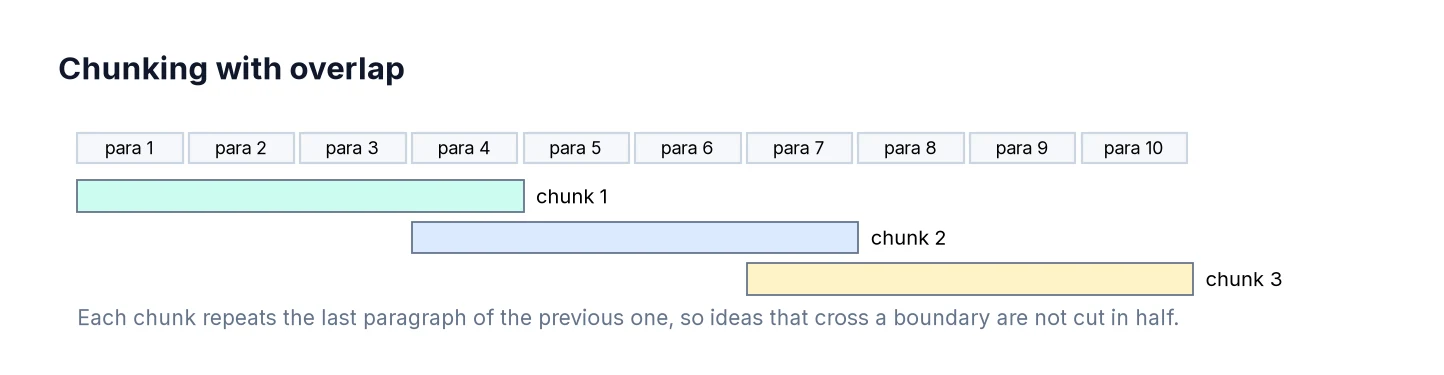
Every model has a maximum input length (its context window) measured in tokens. Even when a document fits, very long inputs can lead to details in the middle being underweighted. Splitting on paragraph boundaries keeps related sentences together:
def estimate_tokens(text):
    # Rough rule of thumb for English: about 4 characters per token.
    # Use the provider's tokenizer for accurate counts.
    return len(text) // 4

def chunk_text(text, max_tokens=120):
    paragraphs = [p.strip() for p in text.split("\n\n") if p.strip()]
    chunks, current = [], ""
    for p in paragraphs:
        candidate = (current + "\n\n" + p).strip()
        if current and estimate_tokens(candidate) > max_tokens:
            chunks.append(current)
            current = p
        else:
            current = candidate
    if current:
        chunks.append(current)
    return chunks

chunks = chunk_text(clean)
for i, c in enumerate(chunks):
    print(i, estimate_tokens(c), "tokens:", c[:60].replace("\n", " "), "...")
The tiny max_tokens is only to show chunking on a short example; in practice chunks are typically a few thousand tokens. A single paragraph longer than the limit would need splitting further by sentence.
Step 4: Write a summarisation prompt
def summary_prompt(text, audience="a busy operations manager", max_bullets=3):
    return f"""Summarise the text for {audience}.

Rules:
- At most {max_bullets} bullet points, each under 25 words.
- Use only information stated in the text. Do not add causes, numbers or recommendations that are not there.
- Keep all figures exactly as written.
- If the text contains decisions or next steps, include them.

Text:
<<<
{text}
>>>"""

print(summary_prompt(chunks[0])[:300])
The rules target the usual failure modes: excessive length, invented details and altered numbers. Delimiters (<<< and >>>) separate instructions from data.
Step 5: Map-reduce summarisation
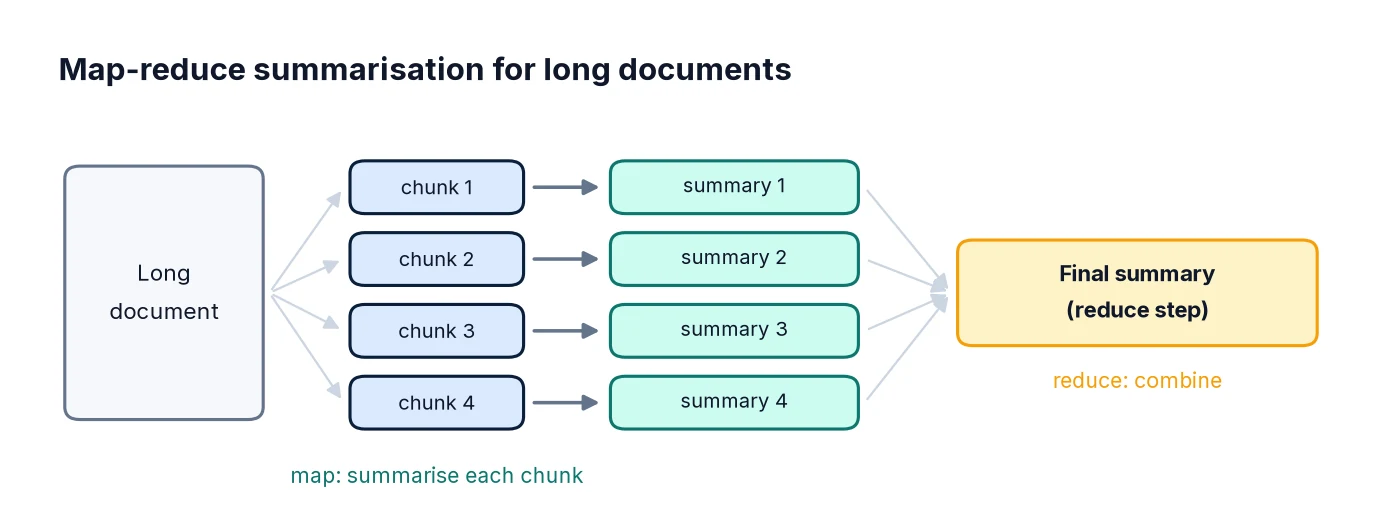
For long documents, summarise each chunk (map), then summarise the combined chunk summaries (reduce):
import os

MODEL = os.environ.get("LLM_MODEL", "gpt-4o-mini")   # check your provider's current models

def call_llm(prompt):
    if not os.environ.get("OPENAI_API_KEY"):
        return None                                   # signal: no model available
    from openai import OpenAI
    resp = OpenAI().responses.create(model=MODEL, input=prompt)
    return resp.output_text

def map_reduce_summary(chunks, summarise):
    partials = [summarise(summary_prompt(c, max_bullets=2), c) for c in chunks]
    combined = "\n".join(partials)
    return summarise(summary_prompt(combined, max_bullets=4), combined)
The summarise argument is any function that takes a prompt and the source text and returns a summary. That makes it easy to swap a real model for an offline baseline, which we build next.
Step 6: An extractive baseline
A simple non-AI summary is useful for comparison and as a fallback. This one scores sentences by the TF-IDF weight of their words and keeps the top ones in original order:
from sklearn.feature_extraction.text import TfidfVectorizer
import numpy as np

def split_sentences(text):
    return [s.strip() for s in re.split(r"(?<=[.!?])\s+", text.replace("\n", " ")) if len(s.split()) > 3]

def extractive_summary(text, n=2):
    sents = split_sentences(text)
    if len(sents) <= n:
        return " ".join(sents)
    tfidf = TfidfVectorizer(stop_words="english").fit_transform(sents)
    scores = np.asarray(tfidf.sum(axis=1)).ravel()
    keep = sorted(np.argsort(scores)[-n:])
    return " ".join(sents[i] for i in keep)

def summarise(prompt, source):
    reply = call_llm(prompt)
    return reply if reply else extractive_summary(source)

final = map_reduce_summary(chunks, summarise)
print(final)
Without an API key you get the extractive version; with one, the LLM version. Comparing the two on your own documents shows whether the LLM is genuinely adding value.
Step 7: Check the summary automatically
You cannot read every summary when processing thousands of documents, but simple checks catch many problems. One of the most useful: every number in the summary should appear in the source.
def numbers_in(text):
    return set(re.findall(r"\d+(?:\.\d+)?", text))

def check_summary(summary, source, max_words=120):
    issues = []
    unsupported = numbers_in(summary) - numbers_in(source)
    if unsupported:
        issues.append(f"numbers not in source: {sorted(unsupported)}")
    if len(summary.split()) > max_words:
        issues.append("too long")
    return issues or ["ok"]

print(check_summary(final, clean))
print(check_summary("Satisfaction rose to 85 per cent and returns fell to 4 per cent.", clean))
The second, deliberately wrong summary is flagged because 85 does not appear in the source (the real figure is 82). Notice, though, that the wrong returns figure of 4 per cent slips through, because the number 4 appears elsewhere in the source (“4 hours”). Number checks are a safety net, not proof of accuracy. Other useful checks include required keywords, banned phrases and length. Pair automated checks with manual review of a random sample. For deeper checking techniques, see AI Hallucinations: How to Check AI Outputs.
Step 8: Summarising many short texts
For survey responses or reviews, it is usually better to classify or tag each item first and then summarise by group, rather than pasting thousands of comments into one prompt. Count themes with pandas (see GroupBy Explained), then ask the model to summarise a sample from each theme. Counts come from your code, not the model, which keeps figures reliable.
Common mistakes
- Letting the model produce statistics, such as “most customers complained about delivery”, without counting in code.
- Exceeding the context window or truncating input silently.
- Vague prompts with no audience, length or format.
- No checks on numbers, names and dates.
- Sending confidential or personal data without approval.
- Not comparing with a baseline, so you never learn whether the LLM helps.
FAQ
How long should chunks be?
Large enough to contain complete ideas and small enough to leave room for instructions and output. Test a few sizes on your own documents.
Can an LLM summarise a PDF directly?
Some tools accept files, but in a pipeline it is usually better to extract text yourself (for example with pdftotext or a PDF library), clean it, and send text.
How do I evaluate summary quality?
Combine automated checks (numbers, length, required points) with human ratings of accuracy and usefulness on a sample.
Next steps
Answer questions over your documents with a simple RAG pipeline in Python, and see prompt ideas in ChatGPT Prompts for Data Analysis.