Retrieval-augmented generation (RAG) is the standard way to make a language model answer questions about your documents – policies, reports, product manuals, internal wikis – instead of relying on what it absorbed during training. The idea is simple: when a question arrives, find the most relevant passages in your documents and give them to the model along with the question, instructing it to answer only from those passages.
In this tutorial you will build a small but complete RAG pipeline in Python: loading and chunking documents, building a search index, retrieving relevant chunks, constructing a grounded prompt, generating an answer, and evaluating whether retrieval works. Retrieval uses scikit-learn’s TF-IDF so everything runs locally with no API key; the generation step calls an LLM only if you have one configured (see Calling an LLM API from Python).
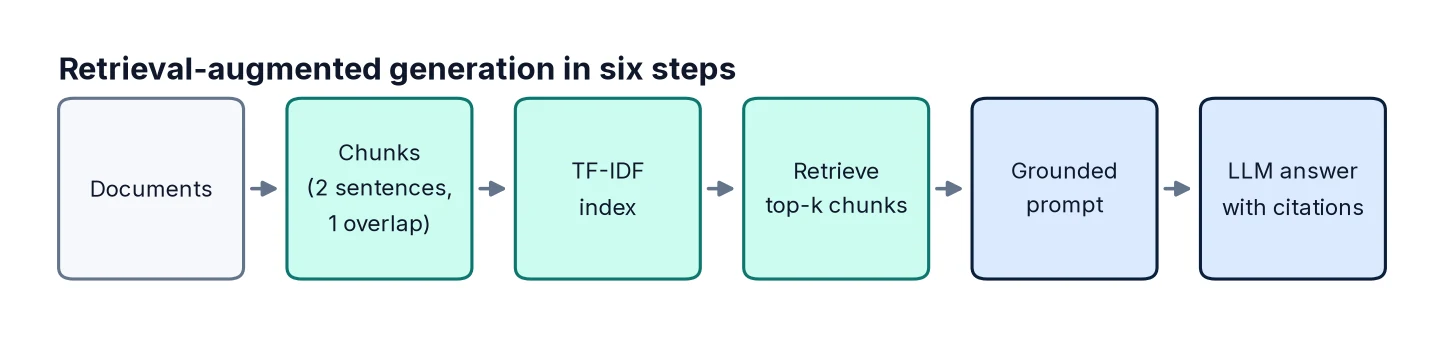
How RAG works
- Index: split documents into chunks and convert each chunk into a searchable representation (TF-IDF vectors here; embeddings in many production systems).
- Retrieve: convert the question the same way and find the most similar chunks.
- Augment: put those chunks into the prompt as context.
- Generate: the model answers using the context and cites which chunk it used.
Because the answer is grounded in retrieved text, you can show sources, update knowledge by updating documents, and reduce – though not eliminate – hallucinations.
Step 1: Load the documents
docs = {
    "returns-policy": """Customers can return most items within 30 days of delivery for a full refund.
Items must be unused and in original packaging. Personalised items cannot be returned
unless faulty. Refunds are issued to the original payment method within 5 working days
of the return being received.""",
    "delivery-info": """Standard delivery takes 3 to 5 working days and is free on orders over 40 pounds.
Next-day delivery costs 6.99 pounds if ordered before 2pm on a working day.
We currently deliver to the UK mainland only. Highlands and islands may take up to 7 working days.""",
    "warranty": """All electrical products include a 12-month warranty against manufacturing faults.
The warranty does not cover accidental damage or normal wear and tear.
To make a claim, contact support with your order number and a photo of the fault.""",
    "loyalty-scheme": """Members earn 1 point for every pound spent. 100 points can be redeemed for a 5 pound voucher.
Points expire 12 months after they are earned. Membership is free and can be cancelled at any time.""",
}
print(len(docs), "documents")
In practice you would read files from disk, a database or a document store and extract text from PDFs or HTML. Keep each document’s ID and source so you can cite it later.
Step 2: Chunk the documents
Chunks should be small enough to be specific but large enough to contain a complete answer. Here we use groups of sentences with one sentence of overlap, so information that spans a boundary is not lost:
import re

def split_sentences(text):
    return [s.strip() for s in re.split(r"(?<=[.!?])\s+", " ".join(text.split())) if s.strip()]

def make_chunks(docs, size=2, overlap=1):
    chunks = []
    for doc_id, text in docs.items():
        sents = split_sentences(text)
        step = max(size - overlap, 1)
        for i in range(0, max(len(sents) - overlap, 1), step):
            chunks.append({"id": f"{doc_id}#{i}", "doc": doc_id, "text": " ".join(sents[i:i + size])})
    return chunks

chunks = make_chunks(docs)
print(len(chunks), "chunks")
print(chunks[0])
Real systems often chunk by a few hundred tokens and respect headings and paragraphs. Chunk size is one of the most important settings to tune.
Step 3: Build the index
from sklearn.feature_extraction.text import TfidfVectorizer
from sklearn.metrics.pairwise import cosine_similarity
import numpy as np

vectorizer = TfidfVectorizer(stop_words="english", ngram_range=(1, 2), sublinear_tf=True)
matrix = vectorizer.fit_transform([c["text"] for c in chunks])
print(matrix.shape)
TF-IDF represents text by weighted word counts, giving more weight to words that are distinctive. It is fast, transparent and needs no external service, but it only matches words, not meanings: “refund” and “money back” look unrelated. Embedding models, which represent meaning as dense vectors, handle that better; you can swap them in later without changing the rest of the pipeline.
Step 4: Retrieve relevant chunks
def retrieve(question, k=3, min_score=0.05):
    q_vec = vectorizer.transform([question])
    scores = cosine_similarity(q_vec, matrix).ravel()
    best = np.argsort(scores)[::-1][:k]
    return [dict(chunks[i], score=round(float(scores[i]), 3)) for i in best if scores[i] >= min_score]

for hit in retrieve("How long do refunds take?"):
    print(hit["score"], hit["id"], "-", hit["text"][:70])
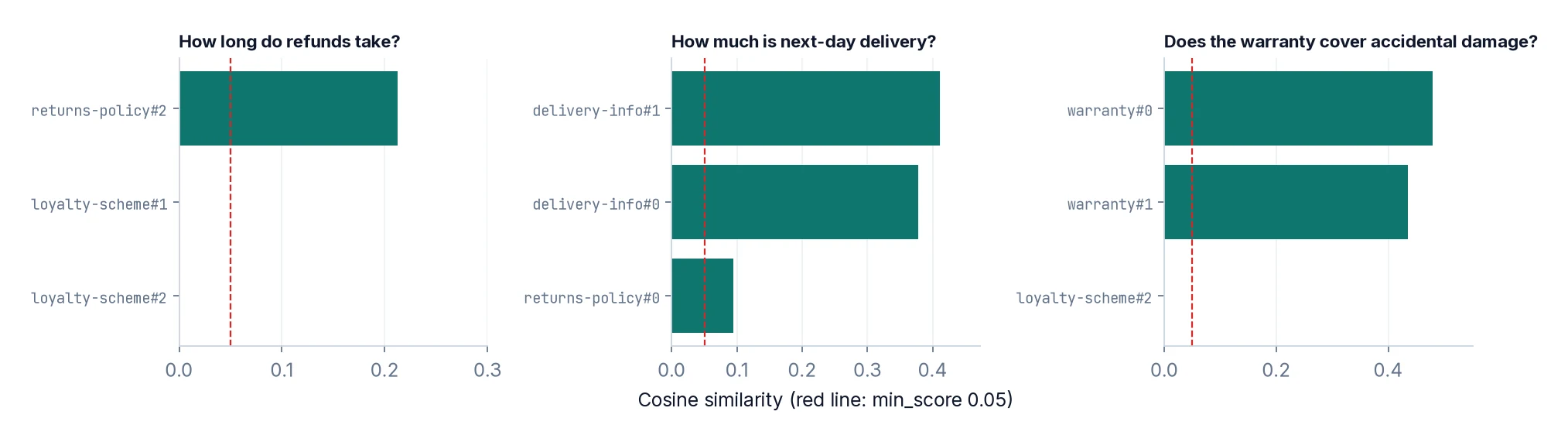
The min_score threshold matters: if nothing is relevant, it is better to return no context, so the model can say it does not know, than to pass unrelated text.
Step 5: Build a grounded prompt
def build_prompt(question, hits):
    context = "\n\n".join(f"[{h['id']}] {h['text']}" for h in hits)
    return f"""Answer the question using ONLY the context below.
- If the context does not contain the answer, reply exactly: "I don't know based on the available documents."
- Cite the chunk IDs you used in square brackets.
- Be concise.

Context:
{context if context else "(no relevant context found)"}

Question: {question}"""

print(build_prompt("How long do refunds take?", retrieve("How long do refunds take?")))
Step 6: Generate the answer
import os

MODEL = os.environ.get("LLM_MODEL", "gpt-4o-mini")   # check your provider's current models

def generate(prompt, hits):
    if os.environ.get("OPENAI_API_KEY"):
        from openai import OpenAI
        return OpenAI().responses.create(model=MODEL, input=prompt).output_text
    # Offline fallback: return the top retrieved passage with its citation
    if not hits:
        return "I don't know based on the available documents."
    return f"{hits[0]['text']} [{hits[0]['id']}]"

def answer(question, k=3):
    hits = retrieve(question, k=k)
    return generate(build_prompt(question, hits), hits), [h["id"] for h in hits]

for q in ["How long do refunds take?",
          "Do you deliver to Northern Ireland?",
          "When do loyalty points expire?",
          "What is the capital of France?"]:
    reply, sources = answer(q)
    print(f"Q: {q}\nA: {reply}\nSources: {sources}\n")
Without a key, the fallback returns the best passage, which is enough to test retrieval. With a key, the model writes an answer from the context. The last question has nothing to do with the documents, and the retrieval threshold means no context is passed, so the system declines rather than answering from general knowledge – which is the behaviour you want in a company assistant. The Northern Ireland question is answerable only by inference (“UK mainland only”), a good test of whether your model reasons carefully from context.
Step 7: Evaluate retrieval
Most RAG failures are retrieval failures: the right passage never reaches the model. Build a small test set of questions with the chunk or document that should be found, and measure how often it appears in the top k results (often called hit rate or recall@k):
tests = [
    ("Can I return a personalised item?", "returns-policy"),
    ("How much is next-day delivery?", "delivery-info"),
    ("Is accidental damage covered?", "warranty"),
    ("How many points do I need for a voucher?", "loyalty-scheme"),
    ("How do I make a warranty claim?", "warranty"),
    ("Is standard delivery free?", "delivery-info"),
]

def hit_rate(tests, k):
    hits = sum(any(h["doc"] == expected for h in retrieve(q, k=k)) for q, expected in tests)
    return hits / len(tests)

for k in (1, 3):
    print(f"Hit rate @{k}: {hit_rate(tests, k):.2f}")
Then evaluate the generated answers separately: are they correct, supported by the cited chunks and appropriately cautious? Write test questions the way real users ask them, including vague and misspelt ones, because those are where keyword search struggles.
Improving the pipeline
- Embeddings for meaning-based search, often combined with keyword search (“hybrid” retrieval).
- Better chunking that follows document structure.
- Metadata filters, for example only documents for the user’s country or product.
- Re-ranking the top results with a more accurate model.
- A vector database once you have many thousands of chunks.
- Access control, so users only retrieve documents they are allowed to see.
Common mistakes
- Skipping retrieval evaluation and blaming the model for missing information.
- Chunks too large or too small, diluting or fragmenting answers.
- No relevance threshold, so irrelevant context is always passed.
- No instruction to decline when the context lacks the answer.
- No citations, making answers impossible to verify.
- Stale indexes that are not rebuilt when documents change.
FAQ
Do I need a vector database?
Not for small collections. An in-memory matrix like the one here works for thousands of chunks. Consider a dedicated store when scale, filtering or frequent updates demand it.
Is RAG better than fine-tuning?
They solve different problems. RAG supplies up-to-date facts from documents; fine-tuning changes style or behaviour. For question answering over changing documents, RAG is usually the first thing to try.
Does RAG stop hallucinations?
It reduces them but models can still misread context. Keep citations and checks in place, as covered in AI Hallucinations.
Next steps
Summarise retrieved documents with LLM summarisation in Python, and review the API basics in Calling an LLM API from Python.