Chat interfaces are fine for one-off questions, but as soon as you want to classify 5,000 customer comments, summarise a folder of reports or add AI to a data pipeline, you need to call a large language model (LLM) from code. This guide shows how to do that in Python safely and reliably: setting up an API key, making a first request, controlling the output, getting structured JSON back, handling errors and keeping costs under control.
The examples use the official openai Python package, because it is widely used, but the same ideas – keys in environment variables, clear instructions, structured outputs, retries and validation – apply to every provider. APIs and model names change regularly, so always check the provider’s current documentation and model list before you build anything important. Every example below also runs without an API key, so you can follow along before signing up.
Step 1: Install the SDK and store your key safely
pip install openaiCreate an API key in your provider’s dashboard, then store it as an environment variable rather than in your code. On macOS or Linux:
export OPENAI_API_KEY="your-key-here"On Windows PowerShell:
$env:OPENAI_API_KEY = "your-key-here"Never paste keys into notebooks you share, commit them to Git or send them in chat. If a key leaks, revoke it in the dashboard immediately. Most providers also let you set spending limits – set one before experimenting.
Step 2: Your first request
import os

MODEL = os.environ.get("LLM_MODEL", "gpt-4o-mini")   # check your provider's current model list

def ask(prompt, instructions="You are a concise, accurate assistant."):
    if not os.environ.get("OPENAI_API_KEY"):
        return "[No API key set - this is where the model's reply would appear]"
    from openai import OpenAI
    client = OpenAI()                    # reads OPENAI_API_KEY automatically
    response = client.responses.create(
        model=MODEL,
        instructions=instructions,
        input=prompt,
    )
    return response.output_text

print(ask("In one sentence, what is a pandas DataFrame?"))
Three things are happening here:
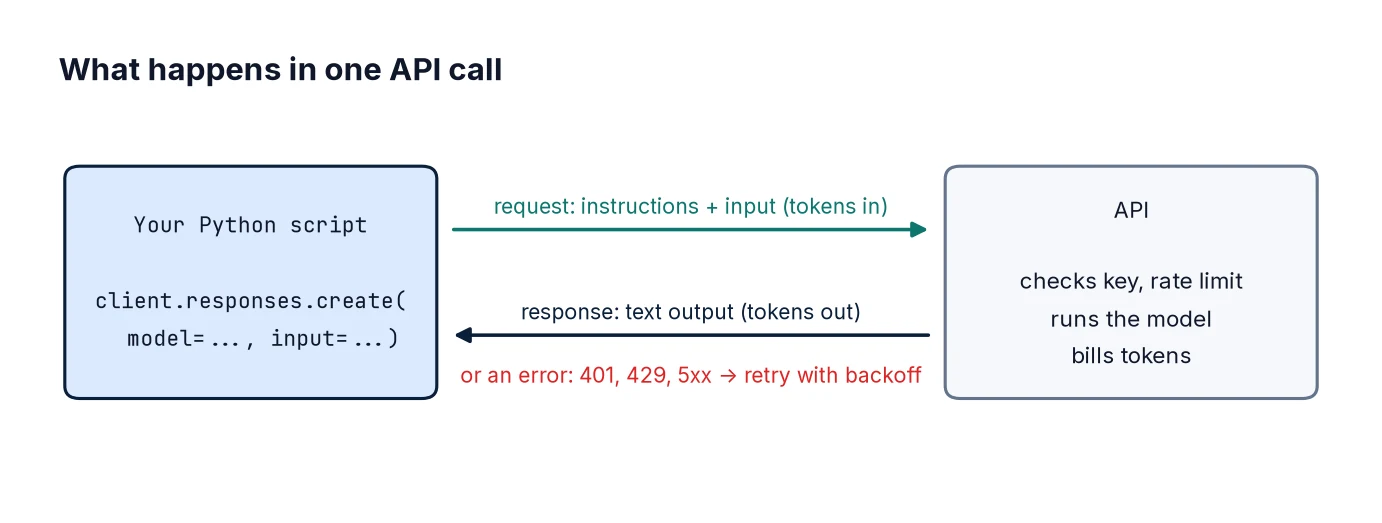
instructionssets the model’s role and rules (often called the system prompt).inputis the user’s request.output_textis a convenience property containing the generated text.
The model name is read from an environment variable so you can switch models without editing code. The older client.chat.completions.create(model=..., messages=[...]) interface is still widely used in tutorials and works similarly, with a list of role/content messages.
Step 3: Write prompts like specifications
Treat a prompt as a specification for a junior colleague. State the task, the input, the format of the answer and what to do when unsure:
def build_prompt(comment):
    return f"""Classify the customer comment below.

Categories: delivery, product quality, price, customer service, other.
Rules:
- Choose exactly one category.
- If the comment fits none, use "other".
- Reply with the category only, in lower case.

Comment: \"\"\"{comment}\"\"\""""

print(build_prompt("Parcel arrived three days late and the box was crushed."))
Delimiting the input (here with triple quotes) makes it clear which text is data and which is instruction. That also reduces the risk of text inside the data being treated as instructions – known as prompt injection. More prompt patterns are in ChatGPT Prompts for Data Analysis.
Step 4: Ask for JSON and validate it
For pipelines you want machine-readable output. Ask for JSON with named fields, and never assume the reply is valid – check it:
import json

ALLOWED = {"delivery", "product quality", "price", "customer service", "other"}

def parse_reply(text):
    """Parse and validate a model reply. Returns a dict or raises ValueError."""
    cleaned = text.strip().removeprefix("```json").removeprefix("```").removesuffix("```").strip()
    data = json.loads(cleaned)
    if data.get("category") not in ALLOWED:
        raise ValueError(f"Unexpected category: {data.get('category')!r}")
    if not isinstance(data.get("confidence"), (int, float)) or not 0 <= data["confidence"] <= 1:
        raise ValueError("confidence must be a number between 0 and 1")
    return data

# Example replies of the kind a model might return
print(parse_reply('{"category": "delivery", "confidence": 0.9}'))
print(parse_reply('```json\n{"category": "price", "confidence": 0.7}\n```'))
try:
    parse_reply('{"category": "shipping", "confidence": 0.8}')
except ValueError as e:
    print("Rejected:", e)
Validation catches the model inventing a category, wrapping JSON in Markdown fences or returning malformed values. Many providers also offer a structured-output or JSON mode that constrains replies to a schema; use it where available, but keep your own validation anyway.
Step 5: Handle errors and rate limits
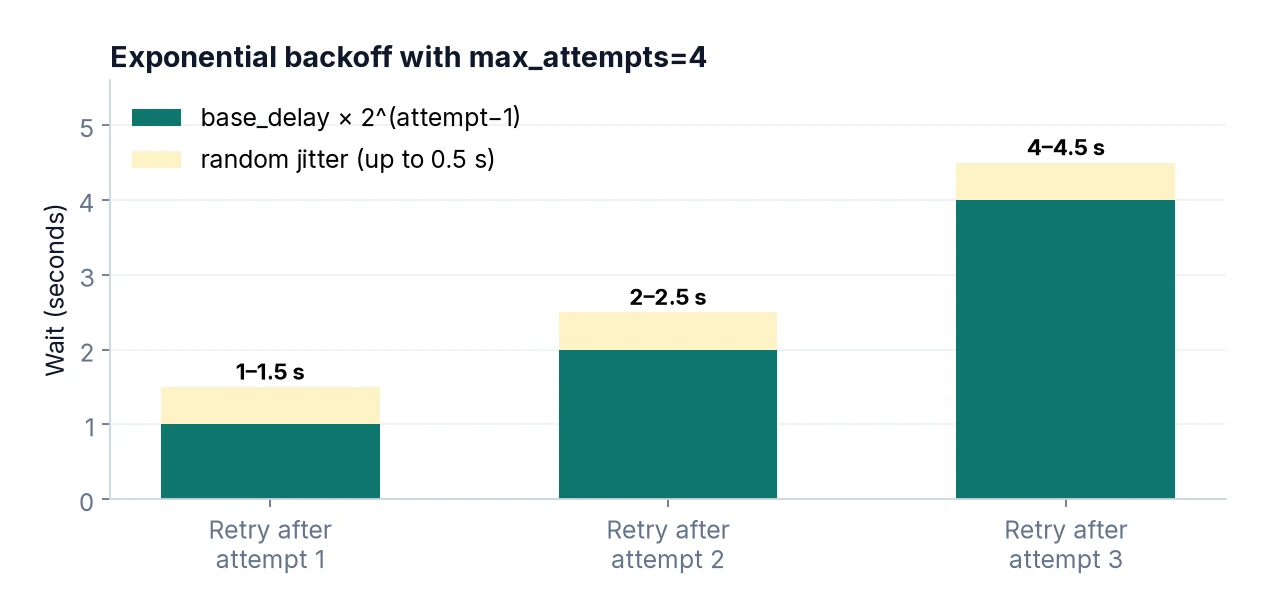
Network calls fail. You will hit rate limits, timeouts and occasional server errors. Retry with exponential backoff:
import time, random

def with_retries(func, max_attempts=4, base_delay=1.0):
    for attempt in range(1, max_attempts + 1):
        try:
            return func()
        except Exception as exc:          # in real code, catch the SDK's specific error types
            if attempt == max_attempts:
                raise
            delay = base_delay * 2 ** (attempt - 1) + random.uniform(0, 0.5)
            print(f"Attempt {attempt} failed ({exc}); retrying in {delay:.1f}s")
            time.sleep(delay)

# Simulate a call that fails twice then succeeds
calls = {"n": 0}
def flaky():
    calls["n"] += 1
    if calls["n"] < 3:
        raise TimeoutError("simulated timeout")
    return "success"

print(with_retries(flaky, base_delay=0.1))
The official SDK already retries some errors automatically and lets you set a timeout and retry count on the client; check its documentation and avoid stacking too many retries on top.
Step 6: Process a table of text
A typical data-science use is applying a prompt to every row of a DataFrame. Keep the raw replies, record failures rather than crashing, and cache results so reruns do not pay twice:
import pandas as pd

comments = pd.DataFrame({"id": [1, 2, 3], "text": [
    "Parcel arrived three days late.",
    "Great quality, but far too expensive.",
    "The support agent sorted my refund quickly.",
]})

def fake_model(prompt):
    # Stand-in for a real call so the example runs offline
    text = prompt.lower()
    cat = "delivery" if "late" in text else "price" if "expensive" in text else "customer service"
    return json.dumps({"category": cat, "confidence": 0.8})

cache = {}
def classify(text, model_call=fake_model):
    if text in cache:
        return cache[text]
    try:
        result = parse_reply(with_retries(lambda: model_call(build_prompt(text))))
    except Exception as exc:
        result = {"category": None, "confidence": None, "error": str(exc)}
    cache[text] = result
    return result

results = pd.json_normalize([classify(t) for t in comments["text"]])
print(pd.concat([comments, results], axis=1))
To use a real model, pass a function that calls ask() instead of fake_model. Always review a sample of outputs by hand, and measure accuracy against a set of manually labelled examples before trusting the results – see Classification Metrics Explained.
Step 7: Keep costs predictable
- You pay per token (roughly, pieces of words) for both input and output. Prices differ between models and change over time – check the provider’s pricing page.
- Test on 20 rows before running 20,000.
- Use smaller, cheaper models for simple classification and save larger models for harder tasks.
- Keep prompts short and limit output length (for example with
max_output_tokens). - Cache results and log token usage, which the API returns in the response’s
usagefield.
Common mistakes
- Hard-coding API keys in notebooks or scripts.
- Trusting output without validation or manual review.
- No retries or error handling, so one timeout kills a long job.
- Running the full dataset first and discovering a prompt problem after paying for it.
- Sending personal or confidential data without checking your organisation’s policy and the provider’s data terms.
- Copying model names from old tutorials – models are retired regularly.
FAQ
Is the API the same as a ChatGPT subscription?
No. API usage is billed separately, usually pay-as-you-go, through a developer account.
Can I get identical answers every time?
Not guaranteed. Lower randomness settings (where the model supports them) make outputs more consistent, but design your pipeline to validate and tolerate variation.
Can I use other providers?
Yes. Most offer Python SDKs with very similar patterns, and some offer OpenAI-compatible endpoints.
Next steps
Put this to work in Summarising Text with an LLM in Python, ground answers in your own documents with a simple RAG pipeline, and learn to catch wrong answers in AI Hallucinations.